Beginners Online Training Guide
Enrolling in an online or offline CFD training course is a great way to get started in cfd and learning about what is cfd trading. You will get informed about all the cfd basics & preliminary steps to take while becoming more & more educated on the different aspects of this industry.
There are numerous online CFD Trading learning courses available that you can choose from, all of which discuss different types of lessons that are created using different models. You do not want to start by spending a lot of money registering in a course that does not provide useful information, so you will need to do some research of your own if you are looking for internet based courses, free course is This Learn To Trade CFD Web Site.
Best CFDs Trading Learning Tutorial
This is a CFD Trading training course for beginners that will take you through the basics of the cfd market and is suited mostly for beginners.
You will know when you've found a really good CFD Trading training course online if you're able to learn about the basics of CFD Trading and detailed information about the world financial markets, tips and cfd strategies for beginners that explain how to take advantage of cfds price fluctuations and time differences to make profits in the cfds market. A CFD Trading training guide course that describes in detail each step that needs to be taken by a beginner so as to make a beginner successful.
Many Beginner Traders wanting to learn cfd education do not know where to start. Because the cfd market is global in nature finding a tutor to teach you CFD Trading based on your location is almost not possible, therefore best source of training information is the internet.
However, getting a good CFD Trading education site online is not an easy thing, most training sites are shallow & don't show you how to trade cfd trading , this is not something that you can just learn within a few days. This site is a comprehensive learn CFD Trading training site that you cannot just read all of the topics within one day, the least amount of time you can take is anywhere between a few weeks to a few months (within this time period you will be training on the Demo Practice Account). Taking less time than this will mean you are not fully prepared and you are less likely to make any profits in cfd markets, take a good amount of time to educate yourself.
From the introduction lessons, to cfd basics guides, to basic trading strategies among other various lessons: all of these have been covered within this learn cfd training beginners guide.
What a Good CFD Tutorial Should Have:?
- CFD Trading basics tutorials
- Technical analysis
- Technical indicators
- Key concepts
- About online brokers
- cfd trading platforms
So where can a beginner get a good training tutorial web site?
You can access all the above CFD Trading training courses and tutorials from this website, all the topics have been discussed in a comprehensive manner and put together on one single learn guide web site.
CFD Demo Practice
CFD Training Education will go together with practice trading, to practice what you learn from the CFD Trading education, you will need to use a practice account or what's commonly known as ademo cfds trading account. To get a demo you can download it from any online broker. Best online platform to download and use is the MetaTrader 4 CFD Software.
It might take a little while before you are ready to start cfd trading with real money, however, taking a tutorial will save you from making common mistakes made by novice traders before they happen. Being able to enter the CFD Trading industry with a lot of financial knowledge is a worthy goal.
1. A Free Training Guide for Beginner Traders
First thing you need is a CFD Trading online training tutorial course that will show you how to trade. The learn trading lessons here are organized in a learn cfd step by step format starting with the introduction to cfd trading, then the cfd basics all the way to the most complex cfd trading concepts. The best way to access the topics is to use the right navigation menu & begin with the top guide & move downwards all the way to the last tutorial, and do not skip any lesson.
- 2. You need a PC computer & an internet connection
This is the Desktop computer you'll be using, you will then find a cfds broker, then you will download the CFD software also known as a platform.
- 3. A cfds broker
You will need to find a broker that you can register with for a free demo cfds trading account, when trading CFD Trading you will place your orders with your broker, and your cfd broker will then connect you to the online cfd market through the software that you've downloaded from their web site.
- 4. CFD Platform - CFD Software
A cfd platform is the software you install on your computer. For this course we shall refer to the MT4 or MT4, because it is the easiest software to learn with and the most widely used. MT4 also requires very little bandwidth, that way even if you do not have a super fast internet connectivity you can use MT4 without any problem. You will need to register first with a broker before you can download the MT4.
Example - MT4 CFD Platform
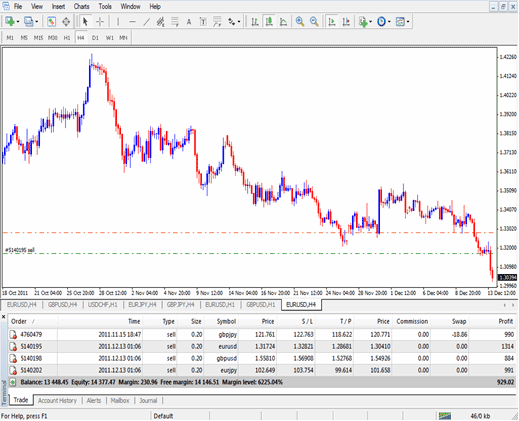
MetaTrader 4 Interface - Learn How to Trade the Online CFDs Market With MT4 CFD Software
- 5. Demo Account
This is a risk free practice account provided for beginners, otherwise known as a demo cfds trading account that you practice with, the cash is virtual, not real money, this money is similar to monopoly money (money used to play the game of monopoly). No one uses real money to begin with, all novice traders use the demo to practice with before investing real money. The demo cfd account is meant to provide free CFD Trading training practice while learning how to trade the online cfds market.
You will need to sign up with an online broker before you can get this free practice account. After you signup & register you'll then receive log in credentials for your practice account. You will then use these details to log in to your practice & begin practicing with.
Setting Up MT4 CFDs Platform
After you have gotten the details you will then install the MT4 software on your PC computer. If you have not installed any software before navigate to folder where you downloaded it (do not know where that is, do this magic trick Press both Ctrl and J i.e. CTRL+J or (CTRL+Y) Keys on your key board, & your downloads will then appear magically), doubleclick the download platform software file & then click next, next until you finish.
After you have installed the MT4 software you will then open the program from the start menu of your computer. After you have opened the MT4 you will see the interface you will be working with and it may seem complicated at first but it's not. The software tutorials will be covered under the learn lessons section where you will get an explanation of how to use this platform in just one hours time.
At the 'top left corner' of the MT4 platform click on 'File' Menu, a drop down menu appears, scroll to where you see 'Login' and click it. You will then be asked to enter the 'username' and 'password' which you got when you registered and signed up on your broker's website.' You are now logged in to your platform and you are ready to begin.
After this you will see your account balance displayed just below the charts and you can now start using the MT4 to place demo transactions on the cfds market. But before you start, you need to know CFD Trading basics by going to lesson 2, at the top navigation menu - under all topics or lessons Topics.
How to Trade in the CFDs Market
You can take the following steps below to setup. However, the process is not as easy as that. In fact, the process can be considered a long and complex process when one starts to become involved in the cfds market. But, if you understand the cfd basics and topics then you will discover your potential for success is significantly increased.
Before taking action or placing a transaction, you need the basic equipment. This means that you will need a laptop or PC desktop computer. It's quite important that the PC or laptop that you use is high tech. It's best to get a desktop computer that has the sole purpose of trading. It is very important that your computer works with speed high CPU speed 3.2 GHz Core 2 Duo , 2 GB RAM, 160 GB hard disk to store your info, DVD ROM and a NIC card, if it is a laptop processor speed 2GHz Core 2 Duo is more than enough. So that you can load cfd charts stream in a live data every second. Fast internet connection, broadband or if you can afford, T1 connection. Following the cfd trends is a must if you want to learn.
Of tutorial you will also need a decent CFD Trading software like the downloadable MT4 & register for a Free Practice Account to begin with, using what is called virtual money like that of monopoly game. CFD Trading is impossible to place transactions and analysis without the cfds charts, these charts are displayed within the trading platform software. CFD traders analyze the cfds price movements using these charts. Search for best out of the many available brokers on the cfd market & then make the choice according to your needs with which cfd broker to open practice account with.
The secret is to learn how to trade cfd market successfully. Decisions will be made based on the preferred strategy. Different people follow different strategies depending on their personality, capital, risk appetite, & their ultimate goals. This web site will teach you various tips & tricks so as to help you achieve your goals.
The first step is to define your goals and then develop an appropriate strategy.
The way to ensure you've the right cfd strategy would be to conduct a practical series of trade transactions on your practice account. This is what is known as practice demo, in this way you can perform your trade transactions & see if you have the right strategy in place without risking loss of cash.
Examples of Simple Strategies & Systems For Novice Traders
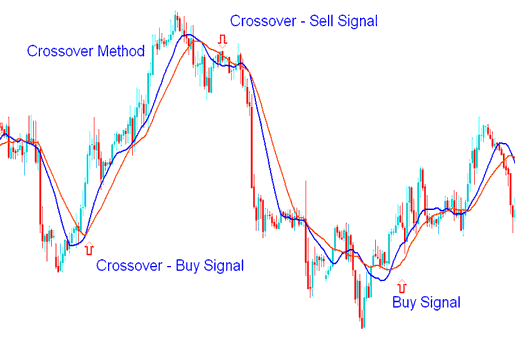
CFD Strategies That Work For Beginner Traders
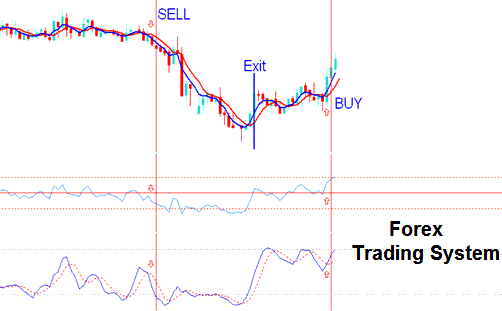
Simple CFD System For Beginners - CFD Training
For further research on coming up with a cfd systems read the cfd trading strategies and cfd trading systems tutorials, where you can find a list of simple cfd strategies that can begin you off.