Trading CFD Open a CFD Real Account - Open a CFD Real Account - Open a CFD Real Trading Account?
To open a real cfd account select a broker online, then from their online website go to account opening section, click the open account registration button key & fill in the account opening form.
Once you fill in the account opening form your cfd broker will open an account for an issue you with an account log in number & account password that you'll use to login to your cfd account from either your computer using the MT4 cfds platform, or from the web using web trader platform or from your phone using the mobile phone trading apps.
As a trader you can deposit your trading capital on this online cfd account and use this capital to open cfds trades online.
You can also log in to the account members area and from the account members are which is also called client cabinet, or trader log in area, or my trader log in area depending on the broker that you are trading with - from this client cabinet a trader can login and make deposits to their cfd account on this client cabinet area or make a withdraw request from their account on this client cabinet area provided by the broker.
Once you open a cfd account you will need to download the MT4 cfds trading platform on your computer and use this cfd platform to login to your cfd account and then open cfds trades on this cfds trading platform.
MT4 CFDs Platform Guide
Before placing any trade on the MetaTrader 4 cfds trading platform, you'll be required to login to your cfd account - using your cfd account sign in number & password. Your account login will then get authenticated - authentication is checking to see if the details you provide for Username and Password are correct details for your cfds trading account.
To start trading in MetaTrader 4 platform, just click on "File", then tap and click "Sign in" button from the file drop down menu as shown below.
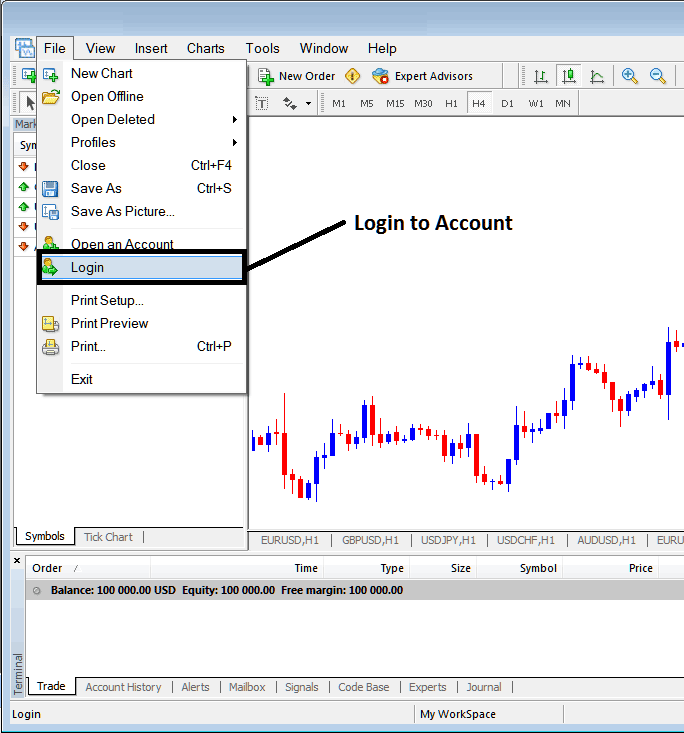
How to Log in to MT4 CFD Account - Trading CFD Open a CFD Real Account