How Do I Set Commodity Sell Orders on MT4 Commodities Trading Charts?
How Do I Set Commodity Sell Orders on MT4 Commodities Trading Charts?
To set a new commodity trading Sell order on the MT4 software use the step by step method explained below:
Place New Sell Order in Tools Menu in MT4 Software
A new commodity trading Sell order to buy or sell a trade can be found on the tools menu found within the MT4 Commodity Software as shown below. The New commodity order button key for placing a new commodity trade is displayed below. (MT4 Keyboard ShortCut Keys 'F9')
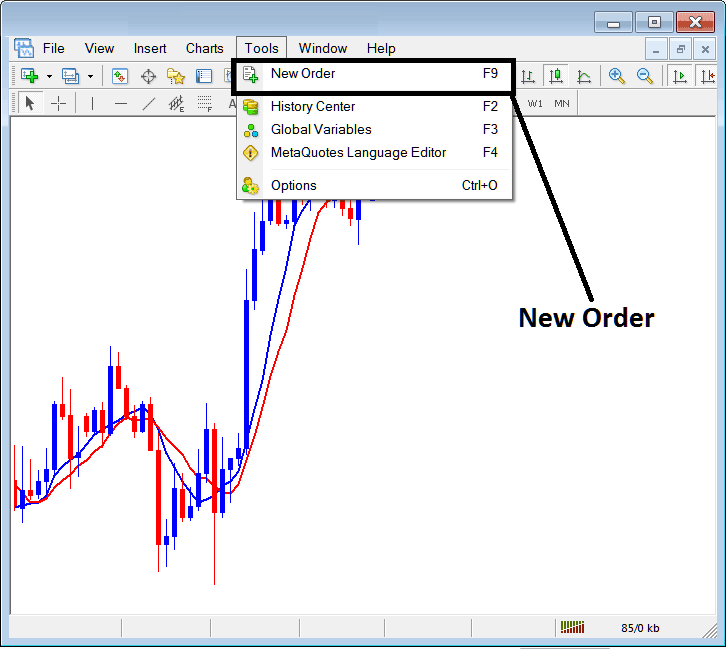
How Do You Set Commodity Sell Orders on MT4 Commodities Trading Charts?
Placing a New Sell Commodity Trading Order
Once you have selected the new commodity order button as illustrated and shown above the following commodities trading order pop up window will pop-up.
This pop up includes settings for placing a new commodity trade Sell order.
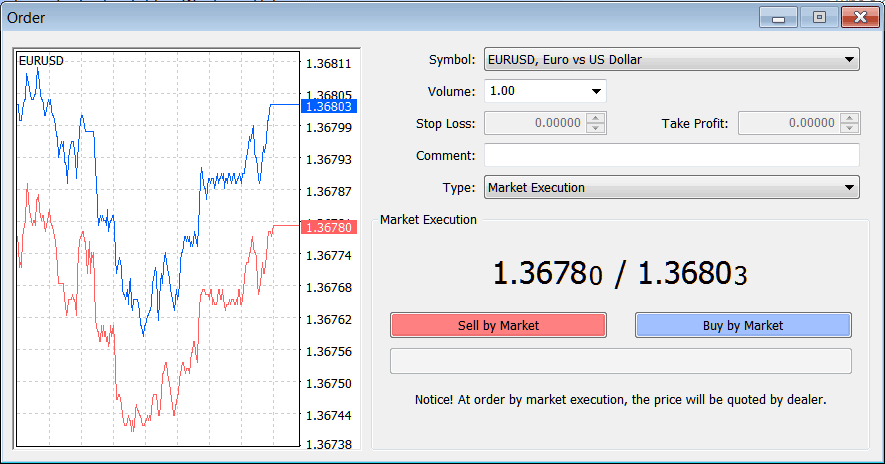
How Do You Set Commodities Trading Sell Orders on MT4 Commodities Trading Charts?
Following Order Setting are specified for setting and placing a new commodity trading Sell order:
Sell by Market - Open a Sell Commodities Trade
To Sell at current commodities price and open new commodity order choose the Sell by Market commodity order button as shown above.
How Do You Set Commodity Sell Orders on MT4 Commodities Trading Charts?