What's Candle in Forex Trading?
A Forex candlestick is a price representation of a forex currency pair which is used to represent the high, low, opening price and closing prices of a currency pair for a specific period of time. Candlesticks resembles a candle with wicks on both ends thus their name - candles.
This type of forex trading price representation is commonly used by traders because it is easier to trade with and interpret when analyzing forex market price movement on the forex charts.
This candles pattern can be selected for trading on MetaTrader 4 platform and traders can then use this candlesticks charts when trading currencies.
Candlesticks Charts - these candles charts use the same price data as bar charts (open, high, low, and close). The candlesticks resembles a candle with wicks on both ends.
How to Interpret Candlesticks Forex Trading Charts
Rectangle section is called the body.
The high and low are described as shadows & plotted as poking lines.
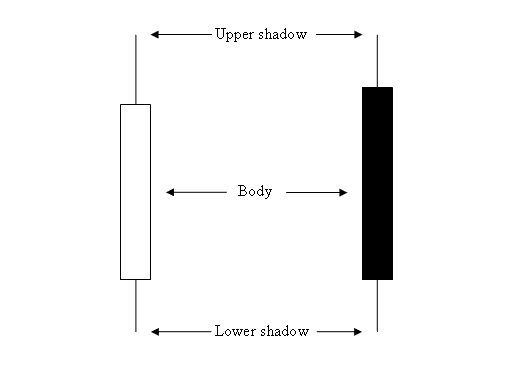
Candlesticks Charts - How to Read Forex Charts Beginner Traders Guide
The color of the candlestick is either blue or red:
- (Blue or Green Color Candlesticks) - Prices moved up
- (Red Color Candlesticks) - Prices moved down
Most Forex trading platforms like the MT4 Platform, use colors to mark the direction of the price. Candlesticks colors used are blue or green: when price moves upwards, color of candlestick is blue: when price moves downward, color of candlestick is red.
Drawing Candlesticks Charts in MT4
To draw these on the MT4 Forex Platform, choose the charts plotting tools within the "MT4 Toolbar" - shown below.
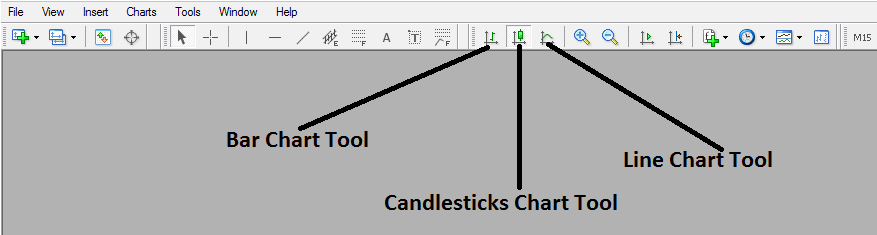
Drawing Candlesticks Charts in MT4
To view this toolbar in MT4 platform go to "View" Next to file at the top left corner of the MT4 Platform, Click "View", Then Click "Toolbars", Then check the "Charts" Button Key. The above MetaTrader 4 toolbar will appear.
Once the above charts tool bar, appears you can then select the type of forex chart you want to convert to, If you want to trade using the bar charts format, click the bar chart tool button as shown above, for line chart trading click the line charts tool button key, for Japanese candles charts click the "candlesticks charts tool button key".