Best MACD Setting for H4 Gold Chart
Adding MT4 MACD Indicator
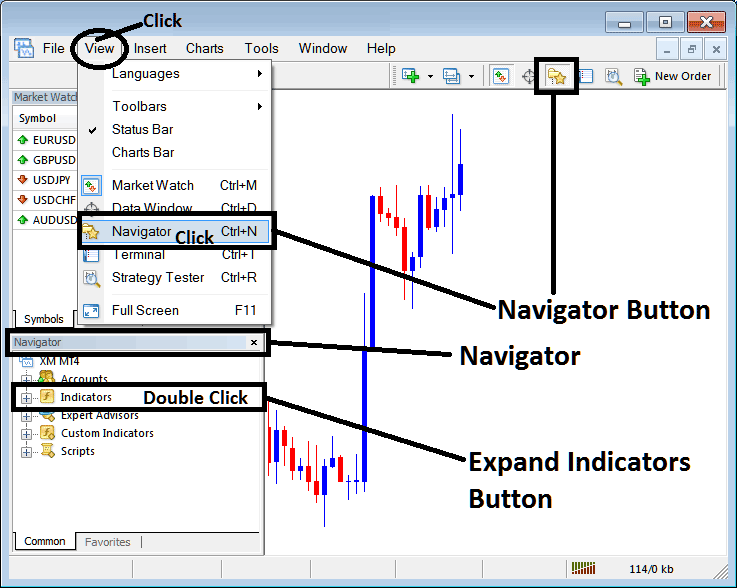
Step 1: Open MetaTrader 4 Software Navigator Window
Open MetaTrader 4 Navigator panel as shown below - Navigate to 'View' menu (then click it) & then choose the 'Navigator' window panel (click), or From the Standard Tool bar click the 'Navigator' button or use key-board shortcut keys 'Ctrl +N'
On MetaTrader 4 Navigator window, select "Technical Indicators", (DoubleClick)
Best MACD Setting for 1 H XAUUSD Chart - Best MACD Setting for 4 H Gold Chart
Step 2: Expand the XAUUSD Technical Indicator Menu on the Navigator
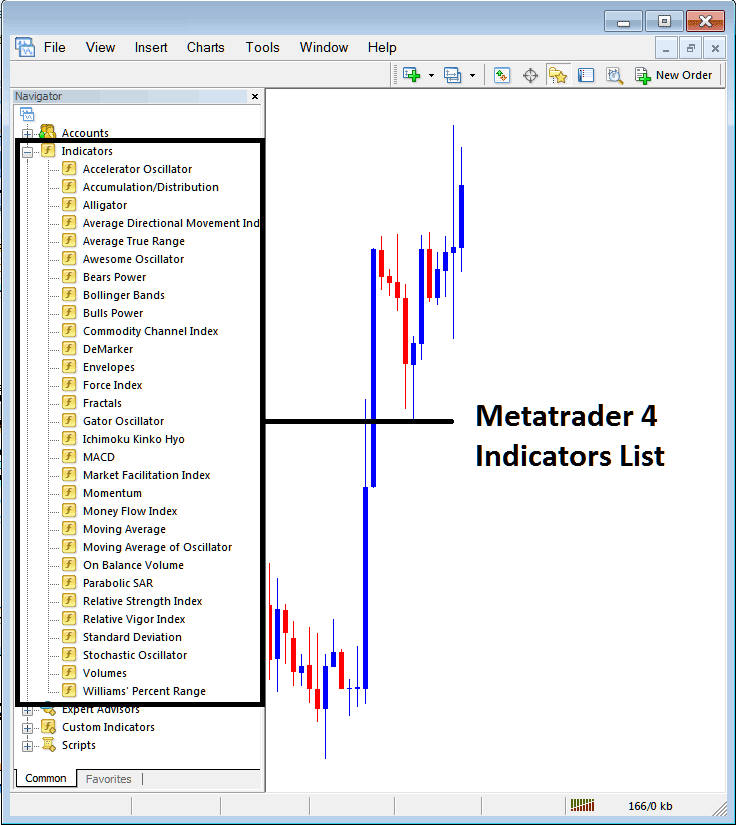
Expand the xauusd trading technical indicators pop up menu by clicking the expand button marker (+) or double click the 'indicators' menu, after this the button will appear as (-) and will now display a list as shown below - select the MACD indicator from this list of MT4 indicators so as to add the MACD indicator on the xauusd chart.
Best MACD Setting for 1 H XAUUSD Chart - Best MACD Setting for 4 H Gold Chart
How to Add Custom MACD XAUUSD Indicator to MT4
If the technical indicator you want to add is a custom MACD indicator - for examples if the MACD indicator you want to add is a MACD custom MT4 indicator you'll need to first add this custom MACD indicator in the MetaTrader 4 software & then compile the custom gold MACD technical indicator so that the newly added MACD custom gold indicator pops up on the list of custom indicators in MetaTrader 4 software.
To learn how to install MACD indicator in MetaTrader 4, how to add MACD indicator window to MT4 and how to add gold MACD custom MT4 indicator on MT4 - How to add a custom MACD gold Indicator in MetaTrader 4.
MACD XAUUSD Technical Indicator Explained
MACD XAUUSD Technical Analysis & MACD Gold Signals
The MACD technical indicator is one of the simplest, reliable, & most oftenly used xauusd technical indicators.
MACD is a momentum oscillator & also a xauusd price trend following indicator.
Construction of MACD Technical Indicator
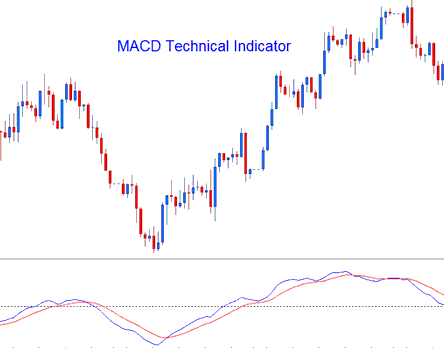
Construction of this MACD indicator calculates the difference between 2 moving averages and then draws that as 'Fast' line: a second 'Signal' line is then calculated from the resulting 'Fast' line and then drawn on the same panel window as 'Fast' line.
- 'Fast' line - Blue Line
- 'Signal' line - Red Line
The 'standard' MACD indicator values for 'Fast' line is a 12-period exponential moving average and a 26-period exponential moving average & a 9-period exponential moving applied to the fast line, this plots the 'Signal' line.
- MACD FastLine - difference between 12 and 26 exponential moving averages
- MACD Signal-line - moving average of this difference of 9 - periods
Best MACD Setting for Gold Swing Trading - Best MACD Settings for Scalping Gold Trading
MACD Gold Technical Analysis & How to Generate XAUUSD MACD Trading Signals
The MACD indicator is a commonly used as xauusd price trend following indicator and works most effectively when analyzing xauusd price trending xauusd price movements. The three common strategies of using MACD indicator to generate gold signals are:
Crossovers Gold Signals:
MACD FastLine, MACD Signal-line Crossover:
- A buy signal is generated when MACD Fast-line crosses above MACD Signal Line
- A sell signal is generated when MACD Fast-line crosses below MACD Signal Line.
However, in a strong xauusd price trending market this trading signal gives a lot of whipsaws, the best gold MACD crossover to use would thus be the MACD Zero Line Crossover Signal that is less prone to gold whipsaws.
MACD Zero Line Crossover Signals:
- When the MACD Fast-line crosses above MACD zero center line a buy signal is generated.
- when the MACD Fast-line crosses below MACD zero center-line a sell signal is generated.
MACD Divergence XAUUSD Trading:
Looking for divergences between the MACD indicator & xauusd price can prove to be very effective in identifying potential xauusd price trend reversal and/or xauusd price trend continuation points in xauusd price movement. There 2 types of MACD divergences:
- MACD Classic Divergence Gold Signals
- MACD Hidden Divergence Gold Signals
MACD Overbought Gold Trading Levels & MACD Oversold XAUUSD Trading Levels:
MACD indicator is also used to identify potential overbought & oversold levels in xauusd price action movements.
These overbought and oversold levels are generated if the shorter MACD Lines separate dramatically from the median, this is a signal that xauusd price action is over extending & the trading it will soon return to more realistic areas.
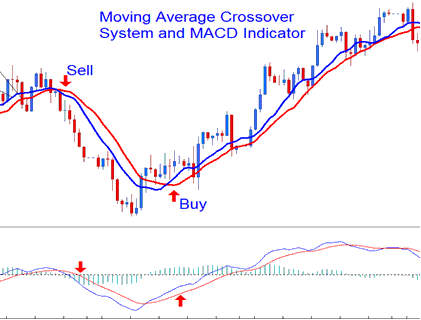
MACD and Moving Average Crossover Gold Trading System
MACD technical indicator can be combined with other indicators to form a trading system. A good MACD indicator combination is with the Moving Average cross over xauusd trading system. A gold signal is generated when both gold indicators give a signal in the same direction.
Best MACD Setting for Gold Swing Trading - Best MACD Settings for Scalping Gold Trading
