Trading XAUUSD Login to MQL5 Account
Steps on how to log in to MQL5 Account from MT5 Gold Trading Software - MQL5 Community Login.
- Open MT5 Platform.
- Select the "Tools Menu".
- Click "Options Menu".
- Select The 'MQL5 Forum Tab' Shown below.
- Type your MQL5 Log in Account Name & Password.
Setting Up An Account to Use for Automated Trade XAUUSD in MT5
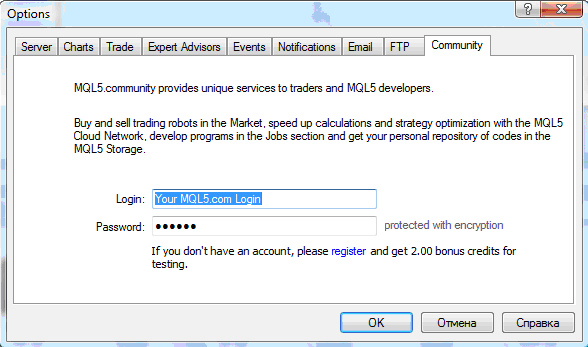
Log in to MQL5 Account from MT5 Gold Software - Trading XAUUSD Login to MQL5 Account
To get to the above panel, Go to ' Tools', Next to " File, View " at the top left corner of MT5 trading platform. Click on Tools >>> Click on Options, the above window panel will pop-up.
Select the " MQL5 Forum " as illustrated above, and then type your MQL5 Account Login details: Your MQL5 Account Log in & MQL5 Account Password.
Once this is complete you will now have complete access to the MQL5 Gold Expert Advisors Market, and you can set up any of the Automated xauusd robots on your MT5 platform and begin automated gold trading with MetaTrader 5 Expert Advisors & MT5 Gold Robots.
MQL5 Account Registration
If you do not have an account with MQL5 you will need to first of all register an account with MQL5 before using that account to automate your trading on the MT5 software.
