
MACD Gold Indicator Crossover Trading Signals
MACD Center line crossovers generate xauusd signals using the center line mark. The sentiment of the xauusd market can be confirmed using the MACD center line crossovers. MACD gold trading crossover above the center line mark generates bullish gold market sentiment while crossover below the center line generates bearish gold market sentiment.
- When the FastLine crosses below MACD Line (not center mark) it shows gold market momentum is slowing - this is not a reversal gold signal or a sell signal, wait for center-mark cross-over.
- When the Fast line crosses above the MACD Line (not center mark) it shows the xauusd market momentum is slowing - this is not a reversal gold signal or a buy signal, wait for center-mark cross-over.
- The Center-Line crossover gold trading signals will be the best signals for confirming buy & sell signals.
Using the Gold chart in the xauusd trading example illustrated and explained below, when MACD fast line crossed below the zero center mark, the sell signal was confirmed and the xauusd market sentiment changed to bearish - downwards xauusd trend.
Also in the xauusd trading example illustrated and explained below when MACD fast line later crosses above zero center mark, a buy signal was generated and the xauusd market sentiment changed to bullish - upwards xauusd trend.
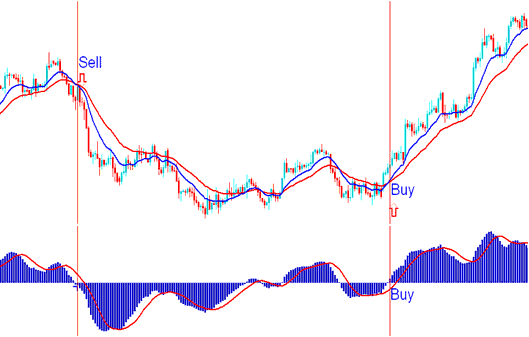
MACD Zero-Line Mark Crossover - Precisely When a Sell Gold Trading Signal and Buy Gold Signal are Generated
Oscillation of the MACD Indicator
The MACD XAUUSD indicator is an oscillator indicator that moves up and down around a zero center line mark. The center-line is the neutral measurement, values above zero will indicate bullish xauusd market trend while values below indicate bearish xauusd trend.
The MACD indicator is also used to indicate overbought and oversold levels. When the MACD reaches overextended levels, then gold is overbought or oversold. However, in a strong upward trending gold market xauusd prices will stay overbought in this case it's better to buy.
Also in a strong down gold trending gold market its better to sell, because xauusd prices will stay in the oversold region for a long time.
Over-bought conditions occur above the zero line while over-sold conditions occur way below the zero mark.
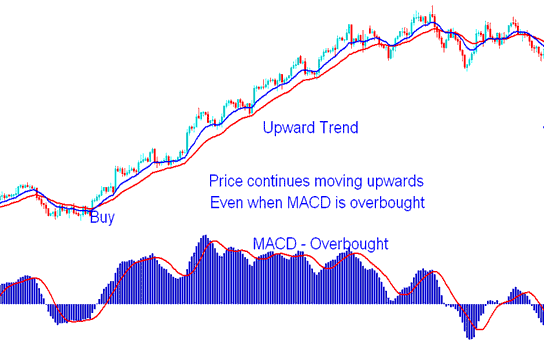
MACD Overbought Region - Gold Trend Continuation Signal