What is MT5 Gold Charts Tabs?
When you open many gold charts on the MT5 gold trading software, these xauusd charts are arranged in navigation tabs bar just below the MT5 gold chart workspace as shown below.
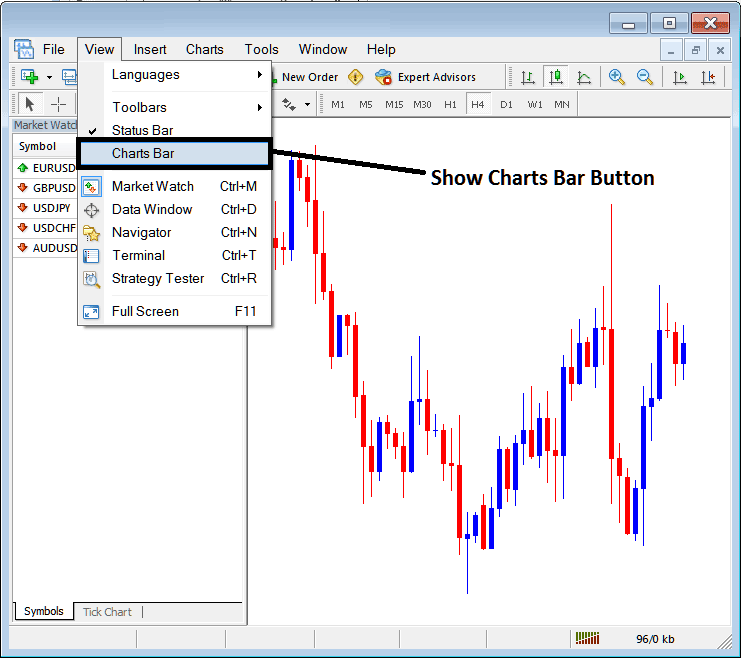
If on your MT5 platform this display bar is not highlighted - as in the xauusd trading examples shown above - you can follow the following procedure to show this MT5 bar as well as these MetaTrader 5 tabs.
On the 'View' menu drop down list option, the fourth button is named "Charts Bar" as shown above. To view this display bar on the MT5 Platform just click and check or tick this button and the it will appear as shown below displaying all the open gold charts as tabs that a trader can use to open any of these listed xauusd trading charts.
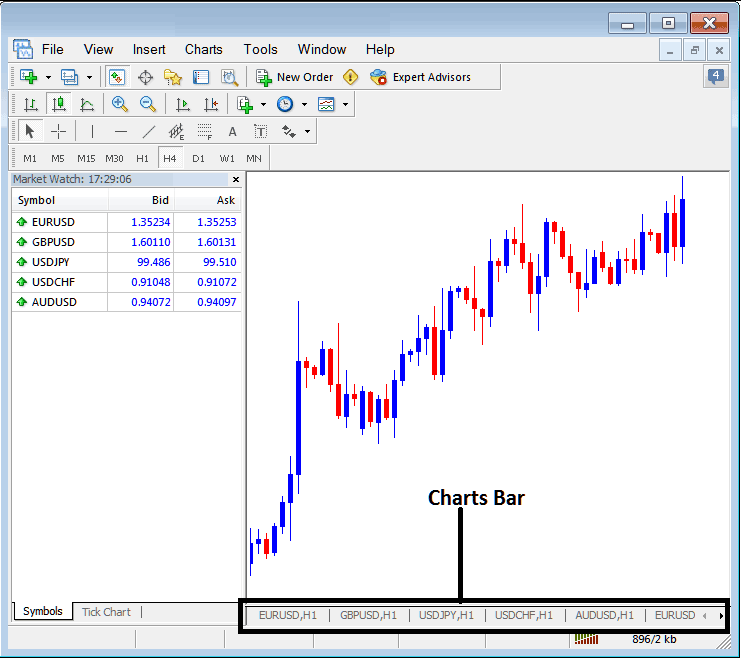
Once you tick This MT5 option the MT5 bar appears and this MT5 bar also has right and left arrows that a trader can use to scroll to the left or to the right and navigate other open gold charts from this MT5 bar.
These MT5 gold chart tabs are used to organize all the open gold charts on the MT5 platform in an orderly manner. This MT5 tab also gives the trader easy access to any gold chart which they may have opened.
As the trader continues to open more gold charts, this MT5 Bar of chart tabs adds navigation arrows to the right and to the left of this MT5 bar, this way a trader can scroll to the left or to the right of this MT5 bar of chart tabs until they find the gold chart that they want to trade.
For ease of navigation each tab on this MT5 bar also shows the xauusd chart time frame for which this particular gold chart is set for. The last MT5 Tab does not show the xauusd chart time frame and a trader has to use the right and left scroll arrow MT5 buttons next to this tab to navigate. Once the trader reaches one end that arrow is then grayed out - as shown above, the right arrow scroll button above is grayed because the first gold chart is the first gold chart on the right side of this MT5 bar.