Trading XAUUSD Login to MetaTrader 4 XAUUSD Trading Account
Login to a MetaTrader 4 Gold Trading Account Procedure
Before placing any xauusd trading on the Gold Account MT4 Gold Trading Platform Trading Account, you will be required to sign in to your MT4 gold trading account using your MetaTrader 4 Gold Trading Account Sign in Number & Password details.
To login & begin trading on MT4 platform, just click on "File", then select and click "Login" button from the file dropdown menu as displayed below.
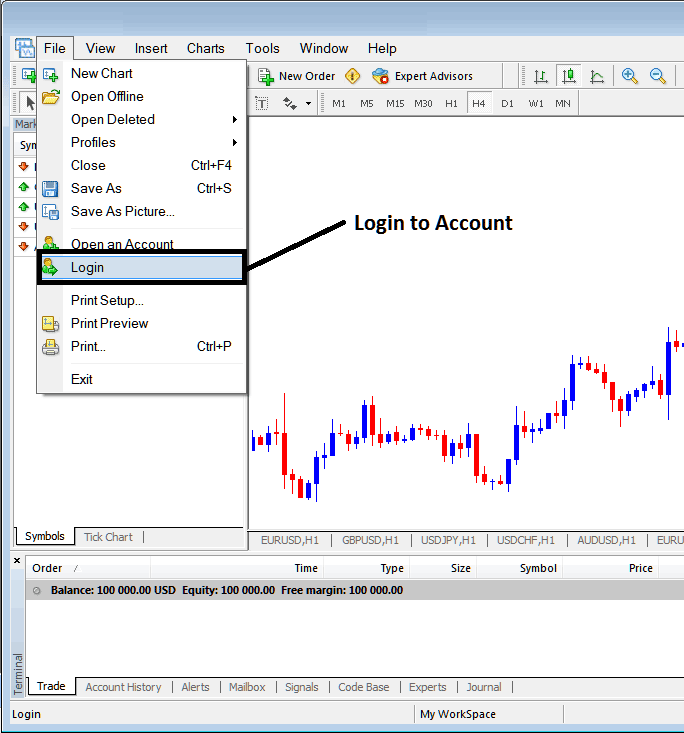
How to Sign in to MT4 Account
As a trader once you click this MT4 platform sign in button, then a pop up window will appear prompting you to in put your MetaTrader 4 Gold Trading Account Login and MetaTrader 4 Gold Account Password as displayed below:
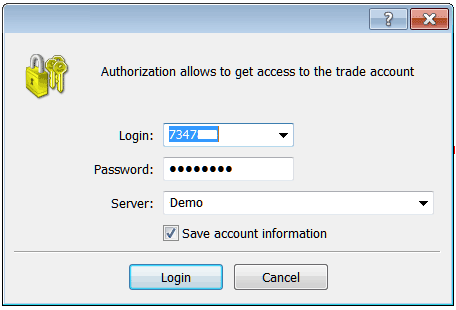
MetaTrader 4 Gold Platform Account Login
Once you in-put your MT4 Gold Trading Login and Password you will then have to select the MetaTrader 4 server: because this is a demo gold trading account, for this instance you'll then choose "Demo", if it was a real xauusd account - live xauusd trading account then you would have to choose "Real" Server on this MetaTrader 4 software option by clicking the drop down arrow on the right side of the above text box.
Then check the box "Save Account Information Data" in the MT4 Window Panel Shown that's above.
Then Click "Login" button on MT4 Window as illustrated above.
