Analyze & Activate a MT4 Indices Bot on the MT4
How Do I Trade Indices & Activate a MT4 Indices Bot in MetaTrader 4 Software?
Steps on Indices Activate Stock EA on the MT4 Platform.
- Select/Choose the Tools Menu
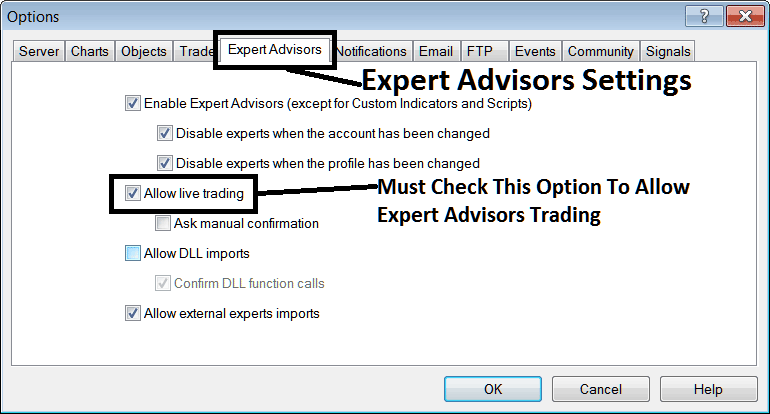
- Choose The EAs Tab
- Press the Check Box 'Enable EAs'
- Press the Tick Box 'Allow Live Trade'
Procedure on how to activate an MT4 Indices EA
Options Setting on Tools Menu on MT4 Software Platform
The Options configuration button serves multiple varied functions within the MT4 trading application. This Options setting control is cataloged under the 'Tools' menu in MT4, mirroring the illustration shown below. The corresponding MT4 shortcut key is 'Ctrl+O'.
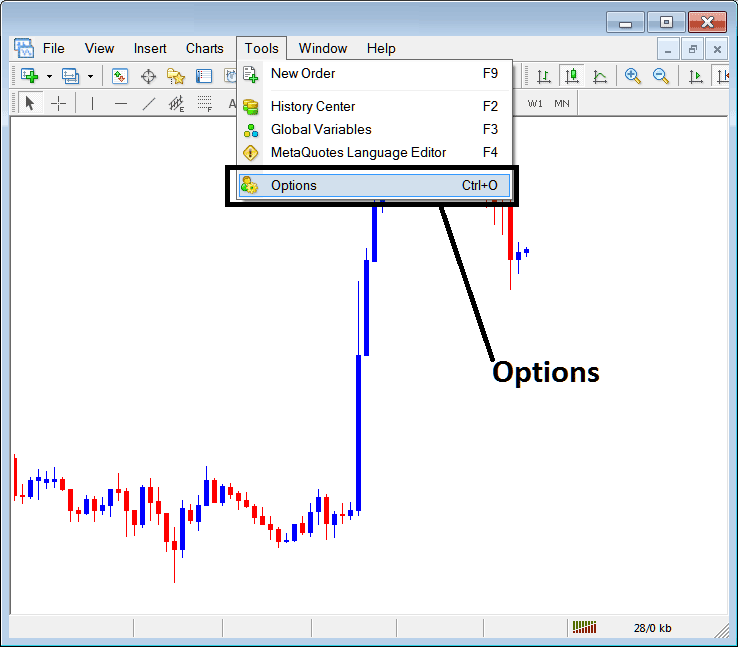
How Do I Activate MT4 Robot in MetaTrader 4
MT4 Options Settings
These settings on the MetaTrader 4 are illustrated below: listing of the various buttons are illustrated as tabs as is illustrated & shown & displayed on screenshot below. As a trader to edit something on this panel just click any of these buttons and then change settings.
MT4 Indices Expert Advisors(EAs) Tab
The Platform EAs panel is illustrated & shown below:
How Do I Activate Indices MT4 Robot on MT4 Platform
Following options are used for MT4 Indices Expert Advisors(EAs) Automated Trading:
Enable MT4 Indices Expert Advisors(EAs) - Allow for EA(Expert Advisor) to be placed on chart for the purposes of automated trading execution
Disable experts when accounts have been changed - login to a different account de-activates MT4 Indices Expert Advisors(EAs)
Disable Experts when the profile has been changed - When you change profiles the Expert advisors setting for allowing automated Expert Advisor trading on new profile is de-activated until you allow and manually place an MetaTrader 4 Indices Expert Advisor(EA) on this new opened chart.
Allow Live Trading - Give Permission to the MetaTrader 4 Indices Expert Advisor(EA) to open trades on the live market.
(Ask Manual Confirmation - no needs for this if you're using MT4 Indices Expert Advisors, leave this one as it's shown and displayed without checking it.)
Allow DLL Imports - Dynamic Link Libraries, that are external, unless required it should be left unchecked/unticked. (External means that these libraries are referenced from a source external and outside your Desktop computer, so you should try to be very careful with this option)
Confirm DLL functions calls - Exercise manual permission for each and every function call, either allow it or disallow it depending on your set trading parameters.
Allow External Experts import - This is used to allow your MT4 Indices Expert Advisor(EA) to reference some data from another MT4 Indices Expert Advisor(EA) that is in another place, away from your pc computer, (External means these MetaTrader 4 EA Robots are referenced from sources external outside your computer, so be careful with this option).
MQL5 MT4 Indices Expert Advisor(EA) Stock EA Community
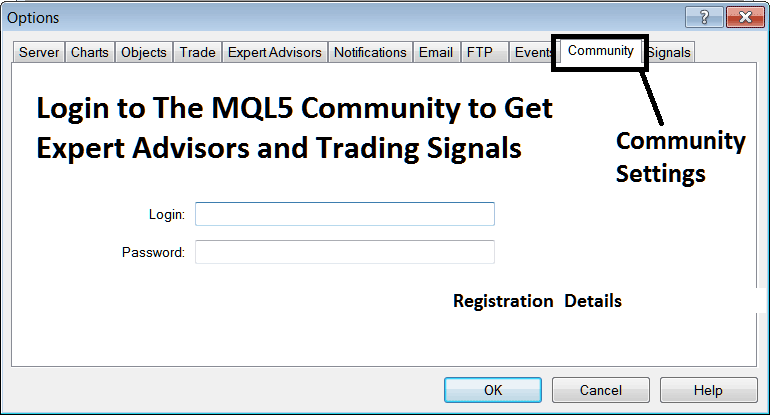
The MQ5 EA bots forum is a forum where stock traders can find other traders and Exchange MetaTrader 4 Indices Expert Advisors(EAs) & Indices Signals with each other.
Indices Traders have to sign up to this MQL5 MT4 Indices Expert Advisors(EAs) forum can then access services from their MT4 platform directly. To get details & particulars on how to access and register and sign up in this forum, sign in to your MT4 software & go to panel illustrated & shown below and follow the instruction guidelines.
How Do I Trade Indices & Activate a MT4 Indices Robot on MT4 Platform?
Interpret & Activate a MT4 Indices Robot in the MT4
Study More Tutorials:
- WallStreet30 Trading Method How to Develop Strategy for Trading WallStreet 30 Training Course
- Best Strategies to AS51 Training Guide
- Indices MetaTrader 4 Introduction Tutorial Course
- How is SPX500 Index Traded Online in the MT4 Software Platform?
- US 100 Strategy Course
- IT 40 in MetaTrader 4 Explained
- How Can I Place DAX in MetaTrader 5 iPad App?
- How Do I Analyze Index Market Trends?
- How Can I Add SPAIN35 on MT5 Platform?
- How to Trade Index with the MT4 Indices Indicators Lists
