Open a Trade on the MT5 Software
How Do I Trade Indices & Place a New Order in MetaTrader 4 Android App?
Open a new trade on the MetaTrader 4 Android Phone App: Open the MT4 Phone App for Android. Select new order on the MT4 Android Phone App menu. Choose from here the financial instrument you as the trader wants to trade - specify the lot/contract size and click Buy/Sell trade button depending on whether you as a indices trader wants to execute a buy or a sell position.
MT4 Android Phone App Place Trade Order Panel
MT4 software is the software which's provided by online brokers to help traders to open their stocks trades. MT4 software has both MT4 software desktop version and MetaTrader 4 software phone app versions - such MT4 Android Trading App for this illustration.
Once you download and setup this MT4 software on your computer or phone - MT4 Android App, you can then begin to trade and transact in the market using this MT4 Android App. All your stock trade transactions will be executed through this MT4 software or MT4 Android App. If you as a trader want to learn features of this MT4 and MetaTrader 4 Android App trading platform, Learn MT4 Guides is a good learn platform lesson to begin with.
To execute these pending orders, launch the MetaTrader 4 Software, bring up the relevant " chart," right-click on the " chart," choose 'New Order,' and then specify whether it is a sell or buy order, as demonstrated below. (**Keyboard Shortcut: Press 'F9'**)
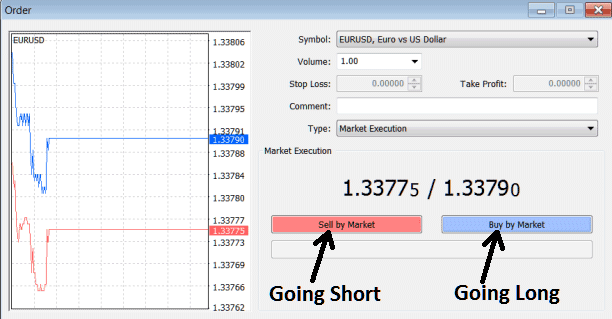
Open a Trade on the MT5 Software - New Trade Order MT5 Platform
New Trade Order MT5 Platform
Get More Topics and Guides:
- How to Add Parabolic SAR Index Indicator on Trading Chart in MetaTrader 4 Software Platform
- How to Find DJ30 Index on MetaTrader 4 iPhone Trade App
- GER30 Trading Method Example
- How to Use Japanese Candles on Stock Index
- How to Add IT40 in MetaTrader 4 Android App
- What is the Value of 1 Point for CAC?
