Saving a Workspace or a Trading System in MT4 Platform
On MT4, you might want to save the space where you work or the system you use for trading so you can easily open it the next time you log in.
Also Review: The Process of Saving a Template in MT4
On the Software There are Two Ways for Saving
The Workspace - The work space is the charts that you've opened along with the info on these trade charts like the attached indices systems. Saving a workspace will save all this data and you can use easily load this info any other time in your platform.
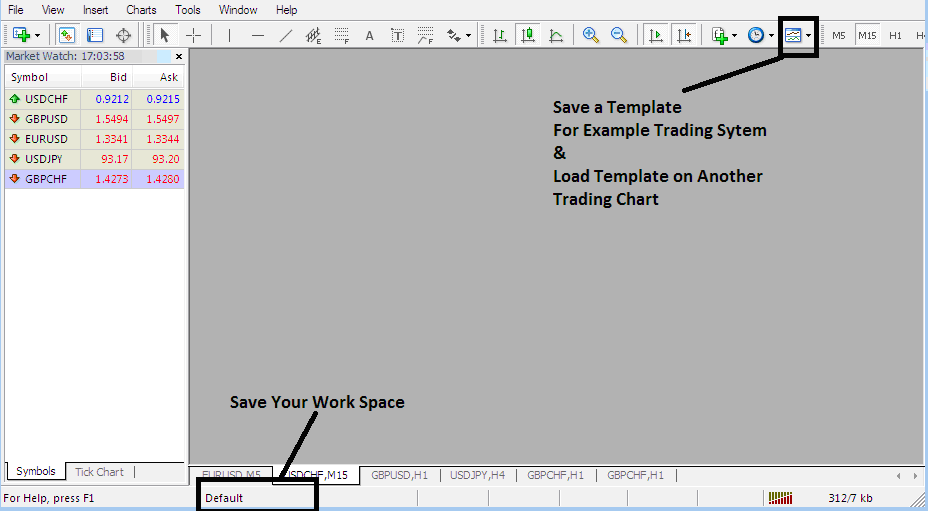
On the work-space button on the MT4 (illustrated below) a trader can save several different workspaces & load them at another time.
A Template, essentially, is the specific indices system you are currently employing for trading. To illustrate, suppose you have just configured four indicators on one chart, but you intend to trade several other charts and wish to avoid manually reapplying the identical trading indicators repeatedly. In this scenario, you save the configuration as a template and then load it onto the remaining charts. The question is, how does a trader accomplish this within the MT4 Platform?
Template and Work Space on MT4 Platform - How to Save MT4 Template System
How to Save MT4 Template System
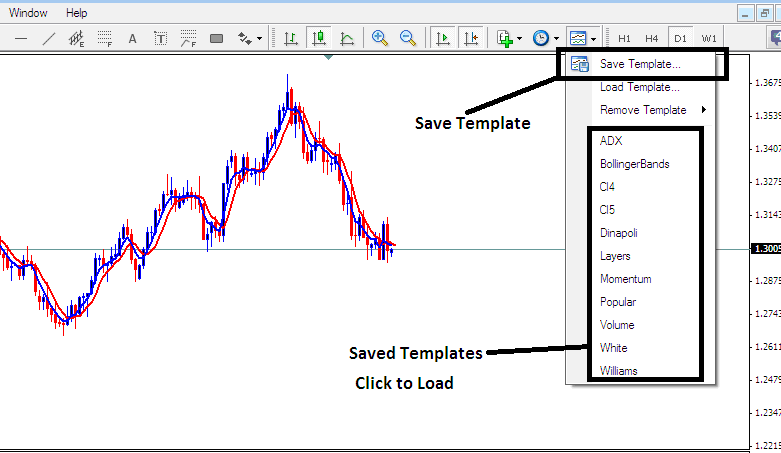
From the picture here, a person trading stock indices only needs to click the buttons under the Templates Icon and then pick the "Save Template" Button.
Saving a Template on the MT4
Saving a Template in the MetaTrader 4 - How to Save MT4 Template System
Saving Trading Strategies on MT4 - To save trading strategies on MT4 software, click the template button as shown in the platform. Choose "Save Template," assign a name to the strategy, and confirm by clicking "OK."
To put a template on another chart, click the "Load Templates Button" as shown earlier, then find and pick the location where you want to load the system from. You can even choose to download a trading system template, if you have downloaded one, or want to pick a template that is saved from another MT4 from another broker within your computer drive C: / Programs / MT4 / templates / Name of Trading Strategy.
To load a template, there is a shortcut list of saved templates: click on an item in the shortcut list to load it.
Saving a Work-Space
To save a workspace (not a template) which is a collection of the open stock charts & all the indices indicators attached to these charts on the Platform, Press the "Save Workspace" button key illustrated and shown below.
Meta Trader 4 Workspace - How to Save MT4 Workspace Charts
Load a Workspace in the MT4 Platform
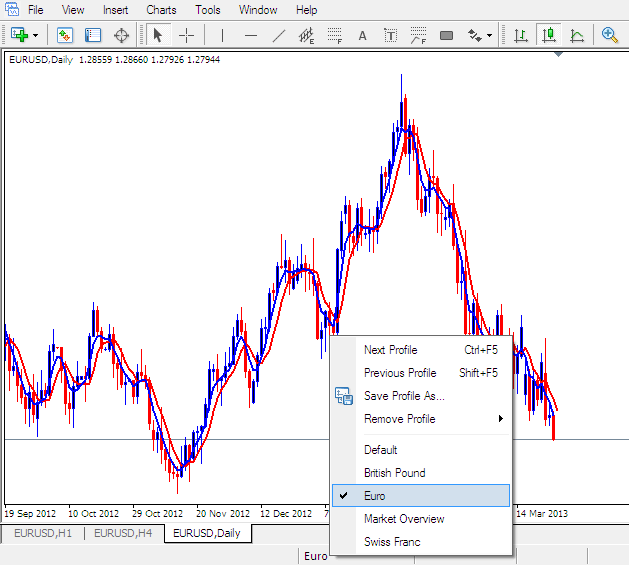
Saving the above Workspace - Press "Save Profile", & choose the profile with the name "Euro"
To load this Workspace anytime, press the shortcut above that's marked "Euro"
To load the British Pound Work-Space, click the above short cut that's marked "British Pound"
In trading, load or save a template or workspace. Apply it to another chart with one click. See the button above. It helps trade easier on stock MT4.
More Lessons:
- Transforming Your Indices Psychology and Mindset When Trading
- How Can I Add NKY225 on MetaTrader 4 Mobile Trade App?
- Index Trailing Stop Loss Indices Order Example Trading Indicator
- Index Platforms for Beginner Traders
- What's CAC 40 Indices MetaTrader 4 Chart?
- Number 1 Stock Index Trade Broker
- How to Place Bollinger Band Indices Indicator on Trading Chart on MT4 Software
- How Can I Add DAX 30 in MT5 Software Platform?
- Testing Indices Strategy Examples Explained
- How to Add MT5 Force Index Technical Indicator in MetaTrader 5 Stock Indices Trading Charts
