CFD Place a Buy Limit CFDs Order in MT5 Platform
CFD Place a Buy Limit CFDs Order on MT5 Software Platform
To set a Buy Limit cfd order on the MT5 Software - Use the "New CFD Order" window in the MetaTrader 5 platform 'Tools' menu.
Place New CFDs Order on Tools Menu on MT5 Platform
A new cfd order to buy or sell a trade can be found on the tools menu that's found in the MetaTrader 5 Platform. Button key for placing a new cfd trade is displayed & illustrated & shown below. (MetaTrader 5 Short Cut Keyboard Keys 'F9')
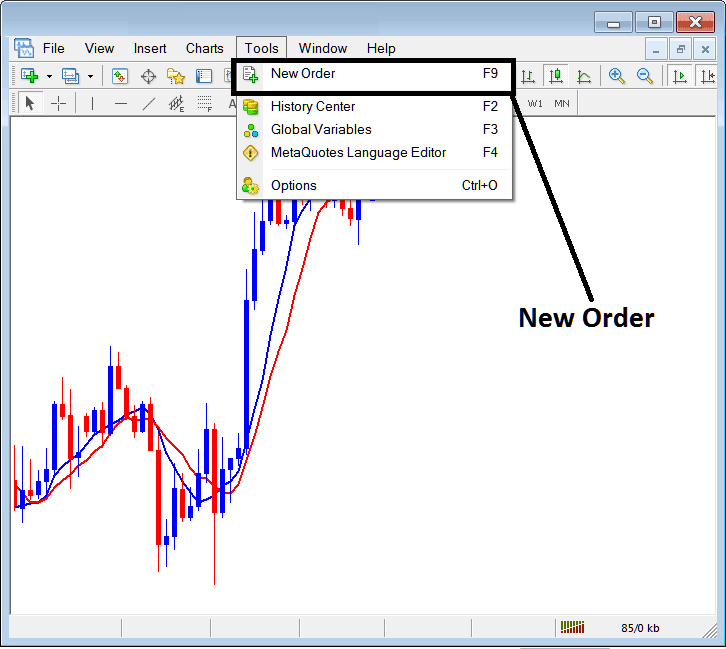
How to Place a Buy Limit CFDs Order on MT5 Platform
Placing a New CFDs Trading Order
As a cfd trader, once you select the new cfd order button as illustrated above the following popup panel will pop-up. This pop-up panel includes the settings for placing a new trade.
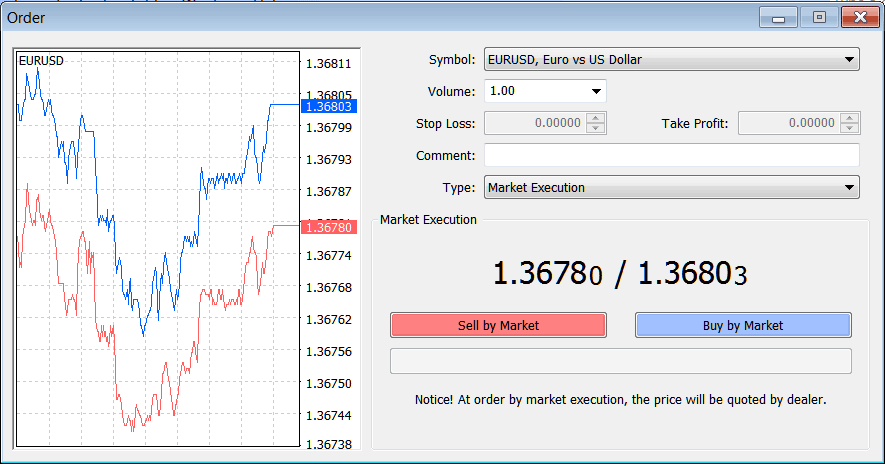
CFD Place a Buy Limit CFDs Order in MT5 Platform
Select the trading instrument that you want to set a Buy Limit CFD Order for - then open it is cfd chart & from the cfd chart set the Buy Limit CFD Order using the Buy Limit cfd order setting procedure described on this example shown below:
Trading CFD Open a Buy Limit CFD Order Trade in MT5 Platform
To set up these buy limit cfd orders on MT5 platform use following procedure explained:
- Right click on cfds chart
- Choose 'Trading' Option on the Menu
- Then Select 'New' Order Option on the Popup widow that appears
- Then on the trade setup popup panel that pops up (illustrated below), under the label 'Type' select option of "Pending CFD Order" instead of 'market execution' trade order
- Under the pending cfd order options select the pending cfd order type: For This trade select 'Buy Limit CFD Order" so as to set a pending buy limit cfd order and after which specify the cfds price at which you want the buy entry limit cfd order executed.
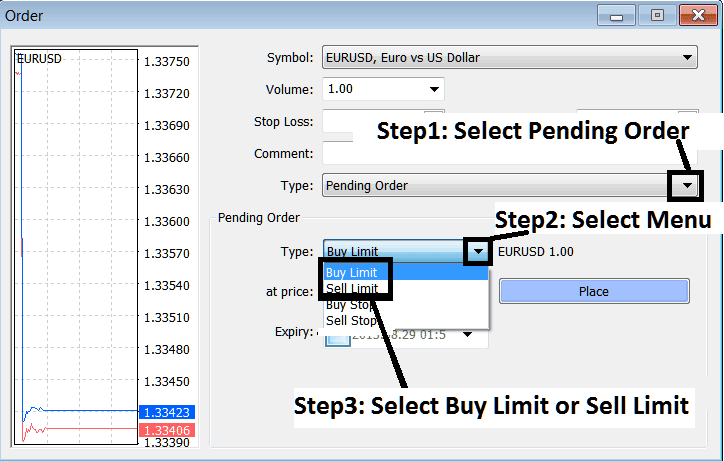
How to Place a Buy Limit CFDs Order on MT5 Software?
Place a Buy Limit CFDs Order in MT5 Platform