Where to Find CFD Leverage Levels in MetaTrader 4 Platform
CFDs Leverage and Margin Levels Shown on MT4
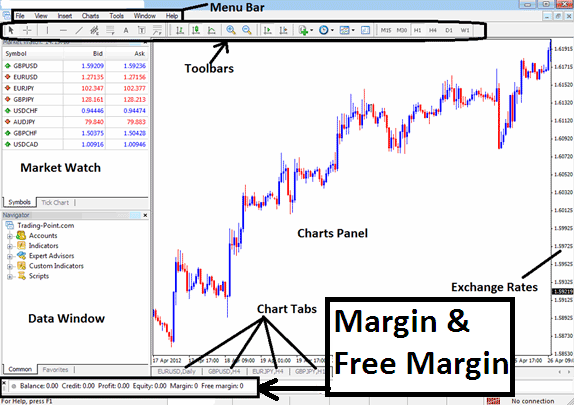
Where to Find CFD Leverage Levels in MetaTrader 4 Platform
The cfd margin examples on MetaTrader 4 cfd Platform below, the set cfd leverage is 100:1, the cfd margin which is 1% is $2683.07, therefore the total amount controlled by the trader is: $268,307 - this is because with this leverage the trader has used little of his money & borrowed the rest, with this set at 100:1, the trader is using 1 % of their account capital, this 1% is equal to $2683.07, if 1% is equivalent to $2683.07 then 100% is $268,307
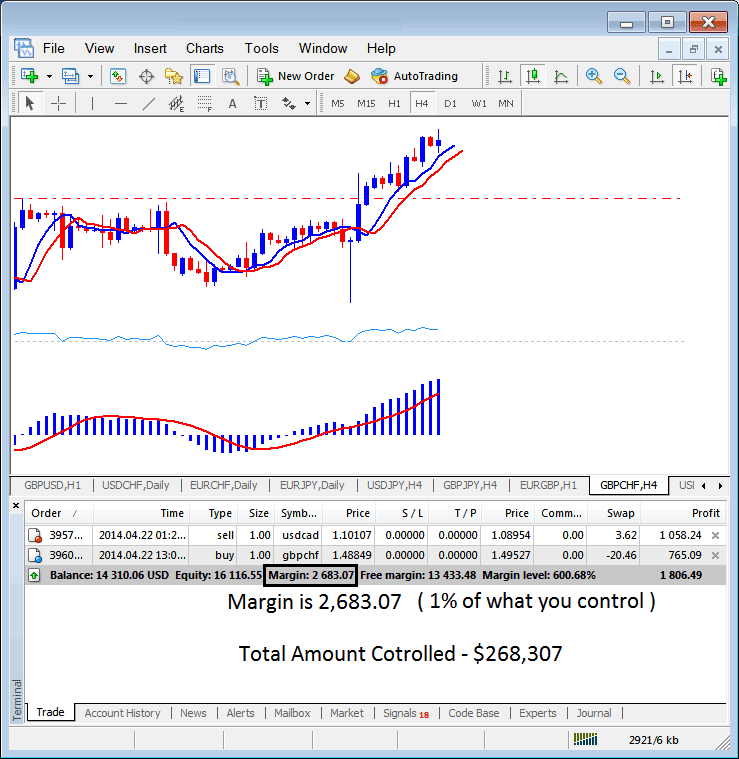
MT4 CFD Leverage Margin Calculation - Calculating CFD Leverage in MetaTrader 4 Explained
In the above image example, the trader is using $2683.07, total controlled amount is $268,307, but trading account equity is 16,116.55, therefore used cfd leverage is ($268,307 divide by 16,116.55) = 16.64 : 1
16.64 : 1
In the cfd trading account above the Used cfd leverage is 16.64 : 1