How Do I Draw Gold Trading Fibonacci Retracement in MetaTrader 4?
How Do I Draw Gold Trading Fibonacci Retracement in MetaTrader 4?
To draw Fibonacci Retracement Technical Indicator on the MetaTrader 4 platform, you can use the following xauusd step by step lesson:
1. Click "Insert"2. Click "Fibonacci"3. Click "Retracement"
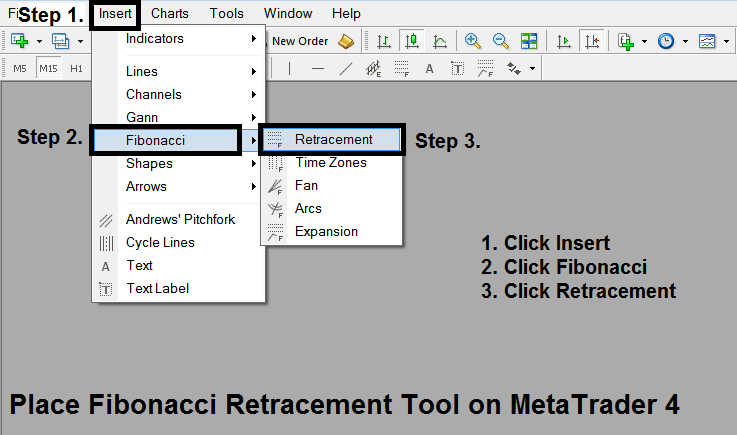
How Do I Draw Fibonacci Retracement on MT4 (MetaTrader 4)
How Do I Draw Fibonacci Retracements Levels on MetaTrader 4?
After adding this Fibonacci Retracement Gold Indicator tool on the MetaTrader 4 platform - this Fibonacci retracement technical indicator can then be accessed from "MetaTrader 4 Line Studies Tool Bar" as shown on the Fibonacci retracement xauusd example illustrated & explained below.
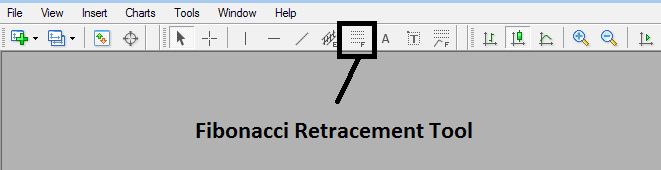
How Do I Draw Gold Trading Fibonacci Retracement in MetaTrader 4?
This Fibonacci retracement xauusd technical indicator is located on MT4 software (Line Studies Toolbar), to go to this MetaTrader 4 platform line studies toolbar click "View" button at tops left corner of MetaTrader 4 platform next to file, then click gold chart "Toolbars", Then Check MT4 "Line Studies".
From above MetaTrader 4 Fibonacci Retracement Technical Indicator tool a trader can then choose this Fib retracement gold tool & place it on gold chart so as to identify where the Fibo Retracement Areas are on the Gold Chart.
Interpret & Draw Fibonacci Retracement on MetaTrader 4?
