How Do I Read Fibonacci Retracement Levels Settings on MT5?
How Do I Analyze Fibonacci Retracement Levels Settings on MT5 Software Platform?
To get Fibonacci Retracement Technical Indicator settings on the MT5 platform - follow the gold trading step by step method explained below:
1. Click "Insert"2. Click "Fibonacci"3. Click "Retracement"
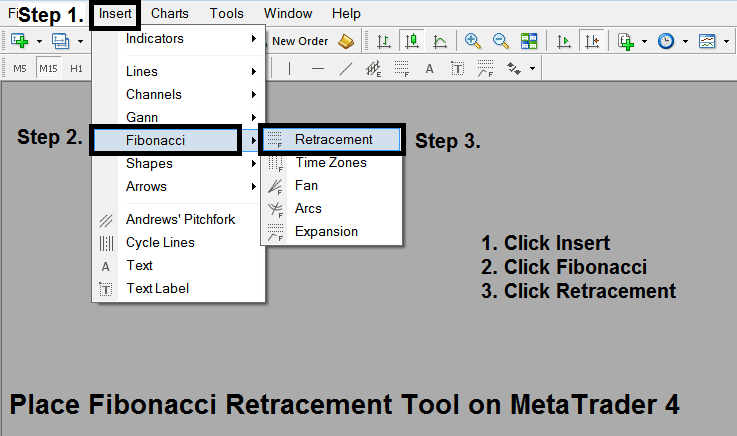
How Do I Interpret Fibo Retracement Levels Setting in MetaTrader 5?
After adding Fibonacci Retracement Technical Indicator tool on the MT5 platform the fibonacci retracement indicator is illustrated on the fibonacci retracement indicator example illustrated and explained below - this Fibonacci retracement technical indicator can then be accessed from "MT5 Line Studies Tool Bar" as shown on the fibonacci retracement indicator example illustrated and explained below. Traders can then add this Fibonacci Retracement Technical Indicator on the MT5 xauusd charts & change the Fibonacci Retracement Technical Indicator Settings by Right Clicking on this fibonacci retracement indicator on the MT5 Platform and then select the indicator properties and change any of the Fibonacci Retracement Technical Indicator settings from the indicator properties pop up window that pops up.
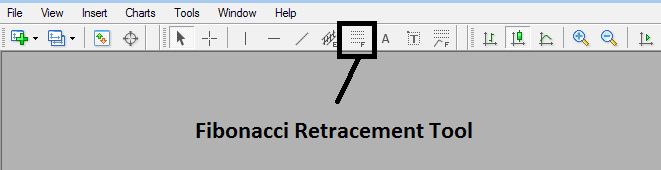
How Do I Interpret Fibo Retracement Levels Setting in MetaTrader 5?
This Fib Retracement indicator is located on MetaTrader 5 platform (Line Studies Tool Bar), to navigate to this MetaTrader 4 platform line studies tool bar click "View" button at tops left corner of MT5 platform next to file, then click "Toolbars", Then Check "Line Studies".
How Do You Analyze Fibonacci Retracement Levels Settings on MT5?
