Drawing Bar Charts in the MT4 Software
The third option on the MT4 charts menu is the “Bar Chart” button. Hit this to display price movement as price bars.
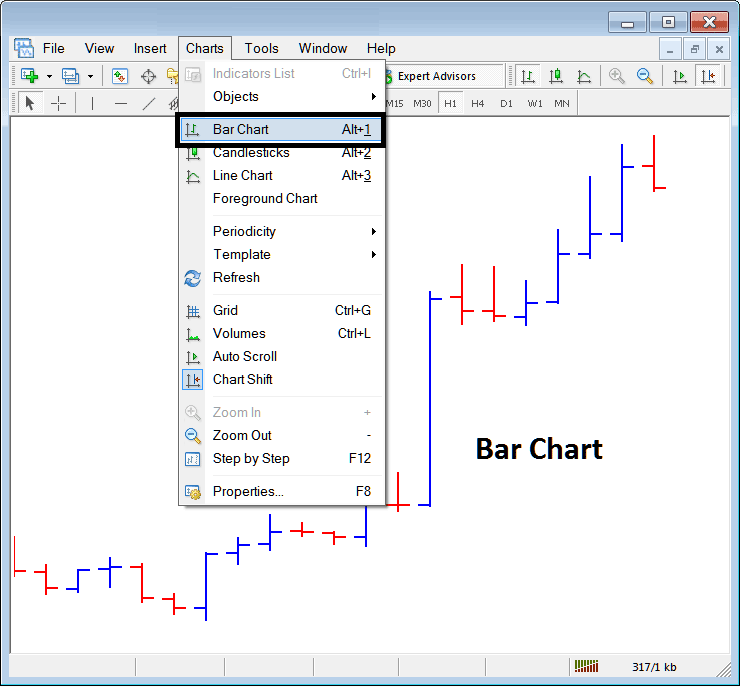
To trade on stock charts a trader may prefer to use the Bar Charts. The above menu button shows how one can select & choose this option on the MT4.
These are drawn using color coding:
- Red bar - Price moved downwards
- Blue bar - Price moved upwards
These graphical bars also feature markings on the left and right edges: these serve to denote the initial price (the short dash on the left) and the final price (the short dash on the right) for that period.
The highest point shows the high of the market price
Lowest point shows the low of the market price
These four points, Open, High, Close, Low, are known as O.H.C.L., which is short for the first letter of each level: these OHCL levels show on every single price bar.
These chart types are generally less favored by traders because they are considered less visually appealing for detailed analytical work, leading traders to prefer alternative visualizations.
Get More Lessons and Tutorials and Topics:
- Trade Index Price Action 1 2 3 Strategy Indices Price Break Out in Stock Index
- Can You Trade US100 in MT5 Software Platform?
- How to Place EU 50 in MetaTrader 4 Android App
- How Can I Find SX 50 in MT5 Software Platform?
- How Can I Add Hang Seng 50 in MT4 Platform?
- How to Place SMI20 in MetaTrader 4 Android App
- What are the Top 20 Indices Methods?
- US 100 Pips Calculation for US100 Stock Index
- How to Get MT4 NETH 25 Index Trade Chart
- How Can I Find GDAXI 30 in MT5 iPhone Trade App?
