Trading XAUUSD Buy & Sell Gold in Gold Trading
The xauusd trading step by step guide on how to buy and sell gold in the online gold market:
- Open MetaTrader 4 software
- Open MetaTrader 4 Market Watch Window shown below on MT4
- Select the Instrument you want to trade
- Open the Gold Trade order window and select "Buy" order or "Sell" order as shown below depending on what type of gold trade order (buy order or sell gold order) you want to open.
MT4 XAUUSD Trading Software
All the gold trading instruments symbols available for xauusd trading in MetaTrader 4 platform will be shown the same way as the xauusd example illustrated & explained below:
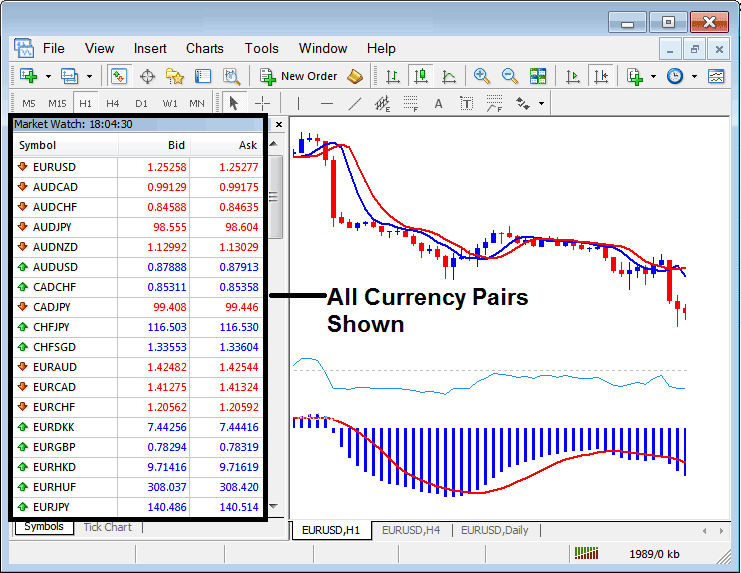
Gold Trading instruments - Trading XAUUSD Buy & Sell Gold in Gold Trading?
How to Open Buy or Sell Order using XAUUSD Trade Order Window on MetaTrader 4
MetaTrader 4 software is the gold trading software that is provided by a broker to help gold traders place their online gold trade transactions.
To set these buy & sell xauusd trade orders, open MT4 Gold Trading Platform, open a "xauusd chart", right click on "xauusd chart", choose "New Order" and then choose gold trade order you want to open - either sell gold order or buy gold order as shown below. (MT4 Gold Trading Platform Keyboard Short Cut Keys for MetaTrader 4 new gold order panel - Press F9 Key)
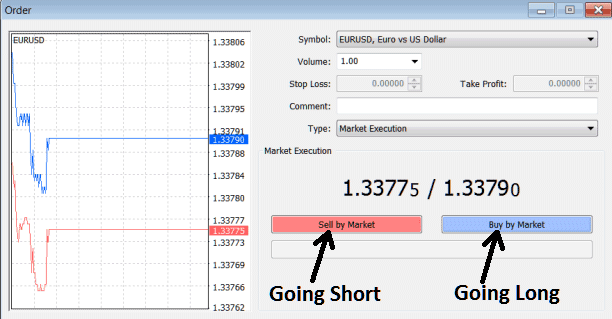
Opening Buy or Sell Gold Trade - Trading XAUUSD Buy & Sell Gold in Gold Trading
