How Do You Interpret MT4 Gold Expert Advisors Robots?
How Do I Read MT4 Gold Trading Expert Advisors Bots?
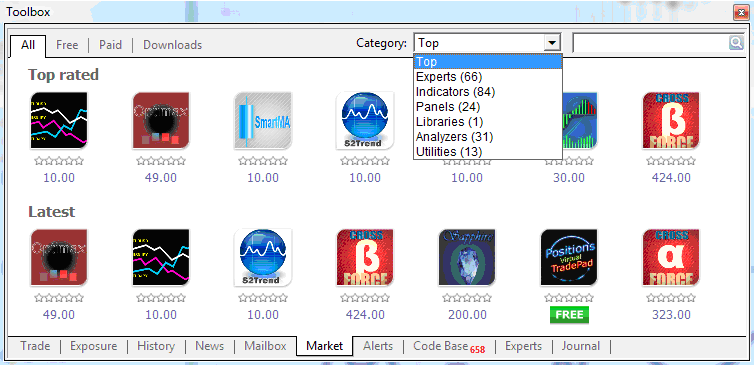
Download the MetaTrader 4 platform and then install it on your computer. After installing MT4 platform - open the MT4 Toolbox; the MT4 Toolbox can be accessed by pressing the keyboard shortcut keys CTRL+T. After opening the MT4 toolbox select ' Market' tab as shown on the MT4 example illustrated & described below.
A list of available Expert Advisors Gold Trading Bots will appear as it is displayed in MetaTrader 4 example illustrated & explained below.
How Do I Interpret MetaTrader 4 Gold Expert Advisors Bots?
You can then choose the Expert-Advisors Gold Trading Bots that is best suited for your gold trading style. Every Expert Advisors Gold Robots that is listed has a detailed description of how it works and as a trader you can use this information to choose Expert Advisors Gold Trading Bots which suits your gold techniques based on this description.
How Do I Read MT4 XAUUSD EAs Robots?
Once you have decided which Expert-Advisors Gold Trading Bots you require, the next step is to register & become a member of this Expert Advisors Gold Trading Bots MQL5 community. After registering on the MQL5 Gold Expert Advisors Robots programming community - you will then get an MQL5 account and you can have access to multiple Expert Advisors Gold Trading Robots. To sign up on the Expert-Advisors Gold Trading Bots forum - navigate to MQL5 Registration Page on the MQL5 site.
After registering in the Expert Advisors Gold Trading Bots MQL5 community - You will then use this MQL5 account and the MQL5 password that you will get to set up the Expert Advisors Gold Bots on your MetaTrader 4 platform as explained below. These Expert Advisors Gold Trading Bots settings will be set on your MetaTrader 4 software that is installed on your Desktop computer PC - & not on MQL5 web-site - but you'll first get these details from the MQL5 web site and then use these details to set up on your MetaTrader 4 software.
How Do I Interpret MetaTrader 4 Gold Expert Advisors Bots
How Do I Interpret MetaTrader 4 Gold Expert Advisors Bots
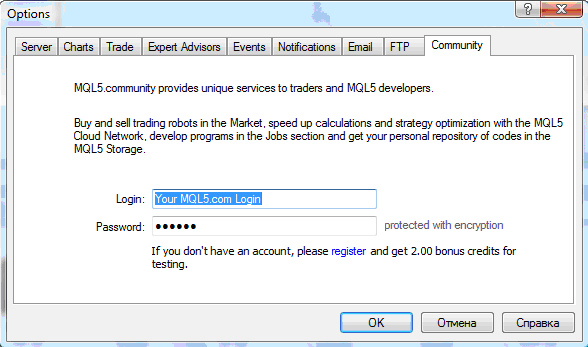
To get to the above window panel on your MetaTrader 4 software, Navigate to ' Tools', Next to " File, View " at tops left corner of your MT4 software. Click on Tools >>> Click on Options - & the above MetaTrader 4 window will pop up.
Select the " Community" tab as shown and illustrated on the xauusd trading examples above, and then type your MQL5 Account Login details: Your MQL5 Login & MQl5 Password.
Once this is setup is complete you will now have access to the Expert Advisors Gold Trading Robots, and you as a trader can use set up any of these Expert-Advisors Gold Trading Bots on your MetaTrader 4 platform and start gold trading with Expert Advisors Gold Bots.
How Do I Interpret MetaTrader 4 Gold Expert Advisors Bots?




