How Do I Set Gold Sell Orders in MetaTrader 5 XAUUSD Charts?
How Do I Set XAUUSD Sell Orders in MetaTrader 5 XAUUSD Charts?
To set a new gold Sell order in MetaTrader 5 software use the step by step procedure described below:
Place New Sell Order in Tools Menu on MT5
A new gold Sell order to buy or sell a trade can be found on the tools menu within the MT5 Platform as illustrated below. New order button for placing a new gold trade is displayed below. (MetaTrader 5 Key board Short-Cut Keys 'F9')
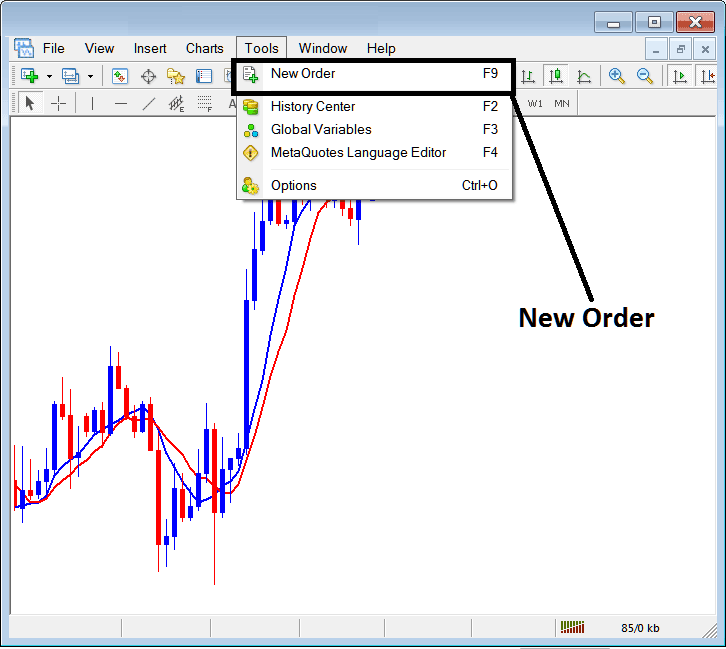
How Do You Set Gold Sell Orders in MetaTrader 5 Gold Charts? - How Do I Set Gold Sell Orders in MetaTrader 5 Gold Charts?
Placing a New Sell Gold Trading Order
Once you select the new gold order button as illustrated and illustrated above following gold trade order pop-up window will pop up.
This pop up includes the settings for placing a new xauusd trading Sell order.
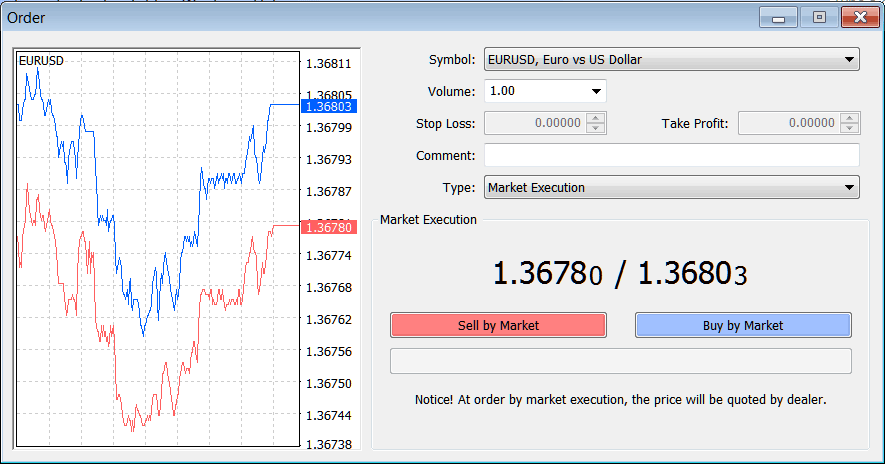
Interpret and Set Gold Sell Orders in MetaTrader 5 Gold Charts? - How Do I Trade Gold and Set Gold Sell Orders in MetaTrader 5 Gold Charts?
The Following Order Setting are specified for placing & setting a new xauusd trading Sell order:
Sell by Market - Open a Sell Gold Trade
To Sell at current xauusd price & open a new gold order select the Sell by Market gold order button as shown above.
How Do You Set Gold Sell Orders in MetaTrader 5 Gold Charts
