How Do I Place a Sell Stop XAUUSD Order on MetaTrader 4?
How Do I Place a Sell Stop XAUUSD Order on MetaTrader 4?
To set a Sell Stop XAUUSD Order in MT4 Platform - Use "New Gold Order" window panel on MT4 platform 'Tools' menu.
Place New XAUUSD Order in Tools Menu in MT4 Platform
A new gold order to buy or sell a trade can be found on the tools window menu within the MT4 Platform. The Button key for placing a new trade transaction is shown below. (MT4 Keyboard ShortCut Keys 'F9')
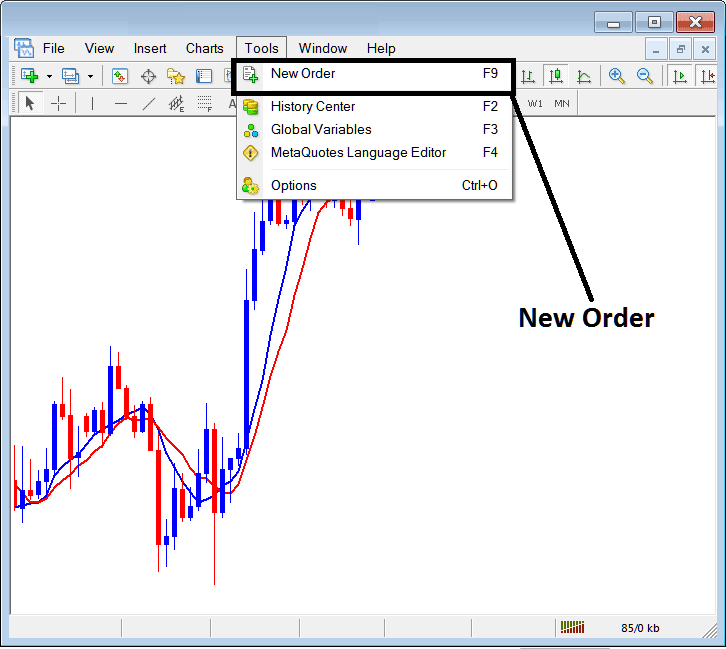
Place a Sell Stop XAUUSD Order in MT4
Placing a New Gold Order
As a gold trader, once you select the new gold order button as illustrated and illustrated above following popup window will pop. This pop up includes the settings for placing a new xauusd trade.
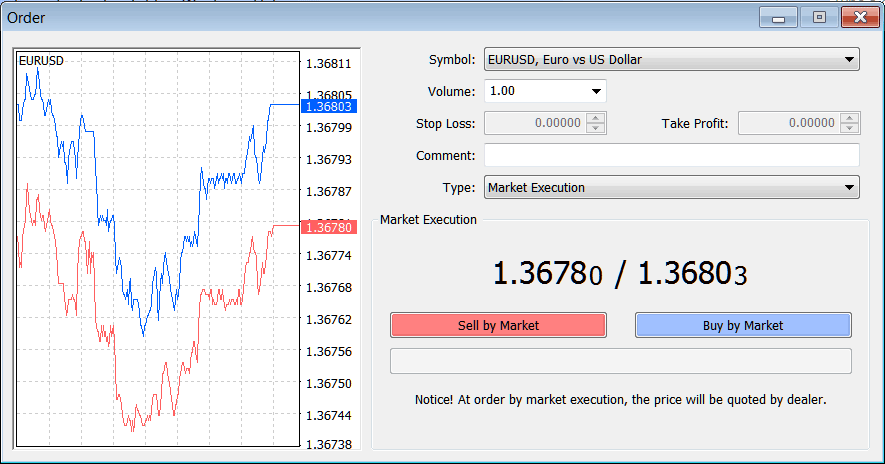
Place a Sell Stop XAUUSD Order in MT4
Select the instrument that you want to set a Sell Stop Gold Order for - then open it is gold chart & from the xauusd chart set the Sell Stop Gold Order using the Sell Stop Gold Order setting procedure described on this example illustrated and described below:
Trading XAUUSD Open a Sell Stop XAUUSD Order in MetaTrader 4
- Open a Gold Trading XAUUSD Trading Chart
- Right Click on Chart to open the Trade 'Order' Window Panel
- On the Trade Order Panel, Select Pending Gold Order as shown below
- Select Pending order Type as Sell Stop Gold Order as Show below
- After selecting Sell Stop XAUUSD Order - Click 'Place' Order & specify the sell stop xauusd price level where the order will be opened
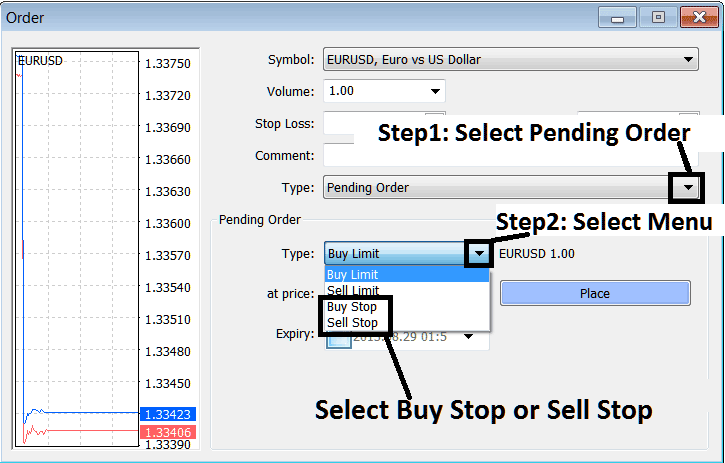
Analyze and Place a Sell Stop XAUUSD Order on MetaTrader 4? - How Do I Trade XAUUSD and Place a Sell Stop XAUUSD Order in MT4?
Place a Sell Stop XAUUSD Order in MT4