What's Metals Trading Sell Short & Buy Long?
In metals trading, there are two different types of metals trades, these two types are:
- Long (buy) - long is if the metals trend is buy/bullish - going long means opening a buy trade.
- Short (sell) - short is if the metals trend is sell/bearish - going short means opening a sell trade.
Buying/Long in Metal Trading vs Selling/Short in Metal Trading
Both terms Buy/Long and Sell/short in Metals Trading, refer to things that metals traders do when they open a metals trade transaction.
Buying Long - metals trading term is used when buying - when opening a buy metals trade transaction.
Selling short - metals trading is used when selling - when opening a metals sell trade.
Long - Going Long is another term used to refer to buying in metals trading, If a trader goes long it means that the trader buys the metals instrument that is heading in an upward trend direction. When the metals price is moving in an upward metals trend the trend is referred to as bullish metal trend.
Short - Going Short is a term used to refer to selling of a metals instrument that is going in a downward trend direction. When the metals price is going downwards then it is referred to as a bearish metal trend.
What it means is that the term, "selling short" can be used to refer to selling in the metal markets. Selling short is used to trade a metals instrument that is predicted to depreciate in value - meaning that the metals price will likely head downwards for the metals instrument, when this metals is sold then it is the same as not holding value in this metals instrument but holding the same value in another form against which this metals is traded against - mostly US Dollars.
Buy/Long
If the metals price is going up metals traders will buy Metal, this is referred to as going long - Therefore long is just another name for buy. When the metal market trend is going up it is referred to as a bullish trend & this is when a metals buy trade is placed by a metals trader. A bullish metals trend is identified by drawing an upward metals trend-line on a metal chart. The example illustrated and explained below shows a long/buy metals trading signal.
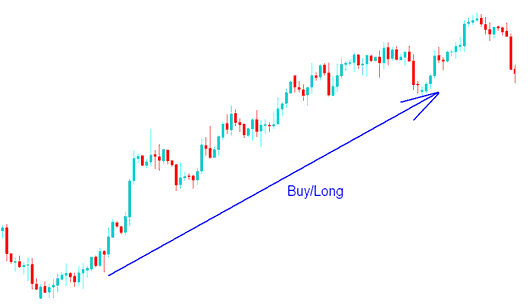
Buy/Long - Buy/Long Bullish Metals Trend - How to Open a Metals Trading Buy Order
Sell/Short
If the metals price is going down we sell Metal, this is referred to as going short. When the metal market trend is going down it is referred to as a bearish metal trend. The example illustrated and explained below shows a downward metals trend, this is when a short sell trade is placed. The short/sell bearish trend is identified by drawing a downward metals trend-line on a metal chart. The example illustrated and explained below shows a short/sell metals trading signal.
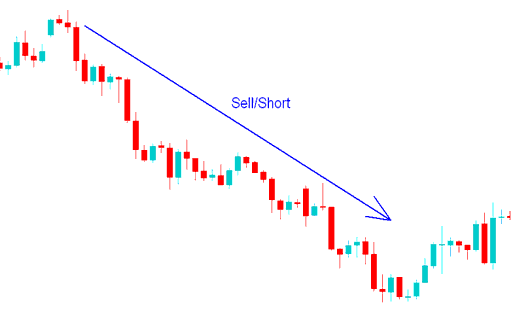
Sell/Short - Metals Trading Sell Trade - How to Open a Metals Trading Sell Trade Order
Metal Charts
A metals chart provides a visual representation of metals prices (drawn on the y-axis) against time (drawn on the x-axis) for metals. The movement of metals prices is drawn on these metals charts. The metals chart can be drawn as candlestick metals charts like the ones shown below or as line metals charts or as bar metals charts.
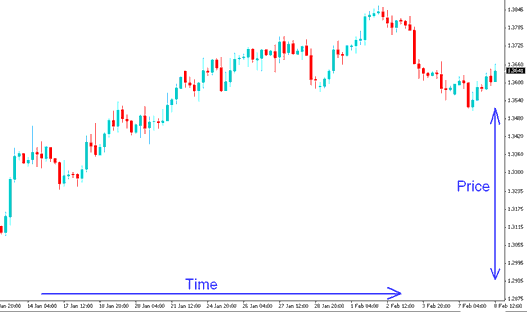
Metals Chart - Candlesticks Metal Charts - Metals Trading Candlesticks Chart
The three most commonly used types of metals charts used in metals trading are:
- Candlesticks Metals Charts
- Line Metals Charts
- Bar Metal Charts
These 3 different types of Metals Charts are covered in the topic Metals Chart Types.
Metals Trading Software
This is the metals trading software that is provided by a broker to help metals traders place their metal trades. Once you download and install this metals trading software platform on your computer you can then begin to trade metals in the Metals Trading market/b>. All metals trading trade transactions are executed through this metals trading platform. If you want to learn about metals trading platforms, MT4 Metals Trading Software is a good metals trading platform to start with. Metals traders can also us mobile phone metals trading apps to place these metal trades.
To set these metals orders you as the trader will open the MT4 Metal Trading Platform, open a "metals chart", right click on "metals chart", choose 'New Order' button, then select the metal order - either sell or buy as shown below. (Keyboard Short Cut Keys - Press F9 Key)
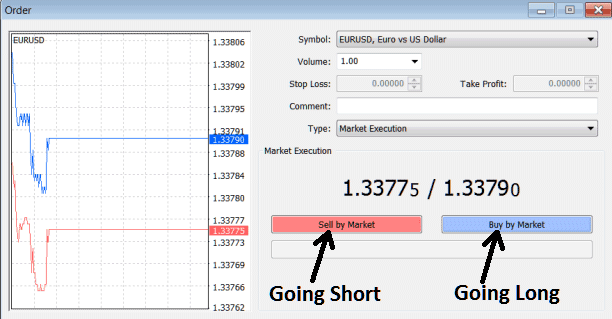
Setting Buy Long Metals Trades and Sell Short Metals Trades on MT4 Platform