Leverage and Margin Explanation and Examples
Required Margin: This signifies the capital sum a broker mandates from you to approve the activation of a trade position. It is typically expressed as a percentage value.
Equity : It's the total sum of capital you've got in your account.
Used margin refers to the portion of money in your account that has been allocated for a trading contract, which is visible in your open positions. As a trader, this amount becomes unavailable for further use once a trade is made, as it has already been committed.
In other words, because your online broker has opened up a trade for you using the capital you've borrowed, you as a trader must sustain this usable margin for your account as a security to allow you the trader to continue using this leverage he has given you.
Available Margin: This represents the unencumbered funds within your trading account that are ready for deploying in fresh transactions. It is the capital not yet utilized to support leveraged open positions - money that hasn't been tied up by initiating a trade yet. This figure is crucial because it ensures you have the necessary resources to maintain your existing open positions, as will be further elaborated.
Conversely, excessive utilization of leverage can drive your available free margin below a specific threshold percentage. At this juncture, your online broker is algorithmically compelled to automatically or mechanically liquidate all your open positions, resulting in substantial losses. The broker intervenes by automatically closing positions because if these leveraged exposures were left active, the broker would incur the risk associated with the capital you borrowed from them.
That's why ensuring you have a lot of free margin is crucial. As a trader, avoid trading more than 5% of your account: ideally, stick to 2%.
Difference Between Leverage Set by Broker & Used Leverage
If the set stock leverage is 100: 1, it means you can borrow up to $100 for each $1 you have, but you don't have to borrow all of the $100 for each $1 you have, but you can select to borrow 50:1 or 20:1. In this instance even though the leverage ratio set 100:1 your used leverage will be the 50:1 or 20:1 that you as a trader have borrowed to make a trade.
Example:
You have $1000 dollars (Equity)
Set 100:1
Leverage Used = Amount used /Equity
If you buy lots equivalent to $100,000 dollars that as a trader you'll have used
= 100,000/1000
= 100:1
If you buy lots equal to $50,000 dollars which you as a trader will have used
= 50,000/1000
= 50:1
If you buy lots equal to $20,000 that you as a trader will have used
= 20,000/1000
= 20:1
In these Three cases you can see that though the set is 100:1
Used is 100:1, 50:1, 20:1 based on size of lots transacted.
Why not just pick the 10:1 option as the highest leverage? It is advised for traders to use even less than this to stay within the rules for proper risk management.
This question may & might seem straight forward but it is not, because when you trade you use borrowed funds referred to as Trading Leverage. When you borrow capital from anyone or a bank you as a trader must maintain security/collateral to acquire a loan, even if the security is depending and based on the monthly deductions from your wages, same thing with Stock Indices Trading.
When trading indices, the safety is known as margin, which is the funds you put down with the online company you are trading with.
This is figured out as you trade. To keep the money you borrowed, you must keep up what is called the needed amount of your own money (your deposit).
Now if Your Trading Leverage is 100:1
With $1,000 in your account and 100:1 leverage, buying one standard lot of $100,000 uses $1,000 as margin. That's the amount you risk if the trade goes wrong. The broker lends the other $99,000. They close the trade if your margin runs out.
But this is if your broker lets you trade with no margin on stock indexes before closing your trades.
For 20 % prerequisite before closing out your transactions automatically/mechanically, then your trades will be closed once your account balance reaches $200
For 50 % requisite of this level before closing out your trade positions automatically/mechanically, then your trades will be closed out once your trade account balance reaches $500
If a 100% requirement is set before automatically liquidating your open trade positions, your trade will close when your account balance reaches $1,000. This means the stock index trade position will effectively close as soon as you initiate it because, even after paying a 1 pip spread, your account balance would drop to $990, thus meeting the 100% requirement. $1,000, therefore your trade positions will immediately get liquidated.
Most online brokers do not demand full margin. Some that require 100% just do not fit you. Pick brokers with 50% or 20% margin rules. Brokers at 20% stand out as top choices. They lower the risk of closing your trades early, as the example above shows.
Your platform auto-calcs this level as Indices Margin Requirements in MetaTrader 4. Higher percent means less risk of trades closing early.
For Example if
Using 100:1
If leverage is 100:1 & you trade lots/contracts equivalent to $10,000
$10,000 divide by 100:1, used equity is $100 dollars
Calculation:
= Capital Used * %(100)
= $1,000/$100 * %(100)
Index Margin Requirements = 1000 %
Investor and Trader has 980 percent above requirement amount
Using 10:1
If leverage is 10:1 and you trade lots/contracts equivalent to $10,000
$10,000 dollars divided by 10:1, used equity is $1000 dollars
Calculation:
= Capital Used * %(100)
= $1,000/$1000 * %(100)
Index Margin Requirement = 100 percentage
Investor and Trader has 80 % above the required sum
Because when a trader has got a higher leverage means that they've more % above what is required (A.K.A. More "Free Margin") their open indices transactions are less likely to get closed. This is reason why traders will choose ratio 100:1 for their account but in accordance to their equity management principles, these traders won't trade above 5:1.
These Levels are Shown on the Platform Screenshot Below as an Example:
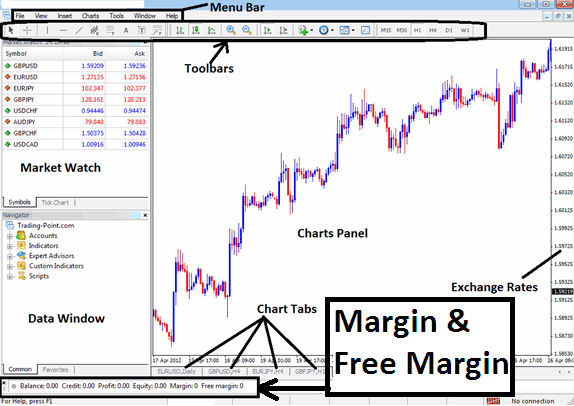
MT4 Stock Software
Get More Tutorials & Topics:
- Ehler RVI, Relative Vigor Stock Index Indicator Analysis
- How Do You Interpret 23.6% Index Chart Fibonacci Pullback Level?
- Evening Star & Morning Star Candle Patterns Described
- Study How to Trade the Hang Seng 50 Indices
- How Can I Find AS 51 on MetaTrader 5 Index Mobile App?
- How Do I Set Dow Jones 30 in MetaTrader 4 iPad Trade App?
- How to Analyze Fib Levels Index Guide
- Opening an Offline Index Chart on MT4 Trading Platform
