How Do I Use Trading Fibo Projection Zones on MetaTrader 5?
How Do I Use Fibonacci Projection Zones on MetaTrader 5?
Setting up Fibonacci Projection Zones on MetaTrader 5
The procedure below explains how to plot Fibo Projection Levels & how to use this Fibonacci Projection Levels Gold Trading Tool.
How Do I Use Trading Fibonacci Projection Levels Gold Trading Tool in MT5?
Steps of Adding Fibo Projection Levels Gold Trading Tool on MetaTrader 5: Fibonacci Projection Levels indicator is not displayed by default on MT5 settings - if the Fibonacci Projection Levels Gold Trading Tool does not appear on your MT5 software - then find "MT5 Line Studies Toolbar" as illustrated below and follow procedure below to add the Fibo Projection Levels Gold Trading Tool:
1. MT5 Line Studies Toolbar - How Do I Use Trading Fibonacci Projection Levels Gold Trading Tool on MetaTrader 5?
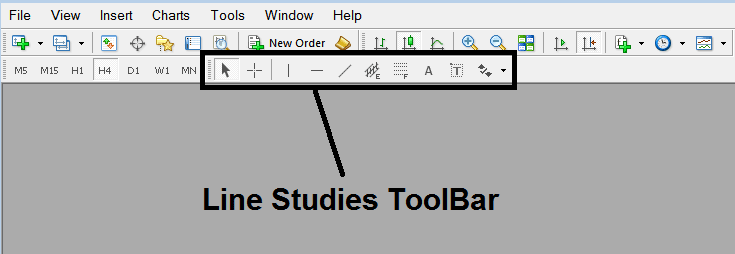
How Do You Use Trading Fibo Projection Zones on MetaTrader 5
2. Customize Line Studies Tool Bar - How Do I Use Trading Fibonacci Projection Levels Gold Tool on MetaTrader 5
Rightclick the Customize button key (displayed below) and a dropdown menu pops up, Select Customize
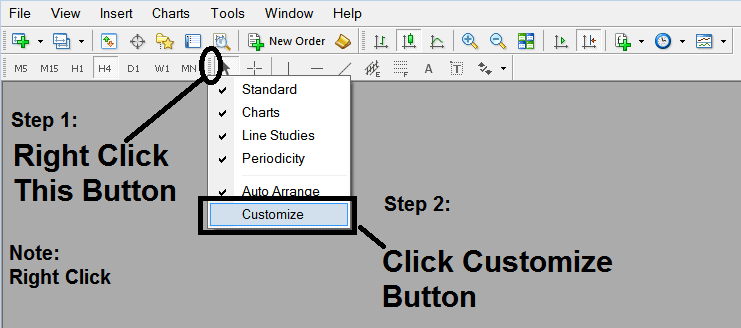
How Do You Use Trading Fibo Projection Zones on Gold MT5 Online
3. Place This Fibo Projection Levels Gold Trading Tool in MT5 - How Do I Add Fibonacci Expansion Gold Tool on MetaTrader 5
Select the Fibo Expansion Gold Tool from the pop up window panel that pops up & Click Insert button and then Click Close.(As Described Below)
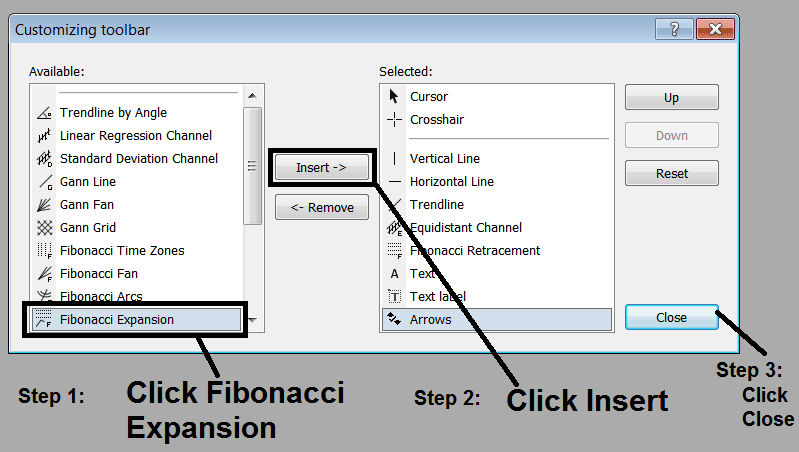
How Do I Use Fib Projection Levels in MT5?
4. Fibonacci Expansion Gold Tool Added on MetaTrader 5
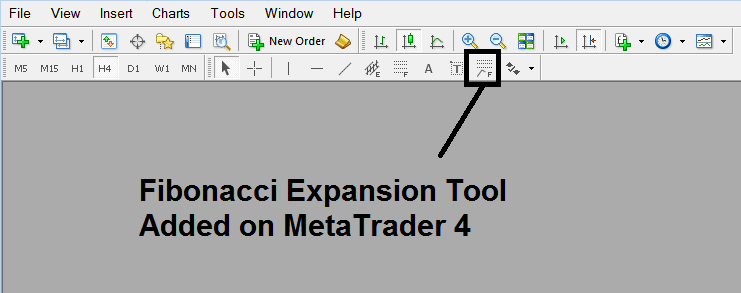
How Do I Use Fib Projection Levels in MT5?
Interpret & Use Fibonacci Projection Zones on Gold MT5 Online?




