How Do I Read Fibonacci Projection on MT5?
Trading XAUUSD Interpret Fibonacci Projection Settings on MetaTrader 5
Fibonacci Projection Trading XAUUSD Indicator Tool on MetaTrader 5
Steps: Fibonacci Projection Levels tool indicator isn't shown by default in MetaTrader 5 settings, if Fibonacci Projection Levels Tool doesn't appear on your MetaTrader 5 platform, (no need for you to download this Fibonacci Projection Areas trading gold indicator) then locate the "MetaTrader 5 Line Studies Toolbar" shown below and follow the steps below to get the MT5 Fibonacci Projection Levels Tool Settings:
1. MT5 Line Studies Tool Bar - Set Up MT5 Fib Projection Trading XAUUSD Indicator Settings on MetaTrader 5?
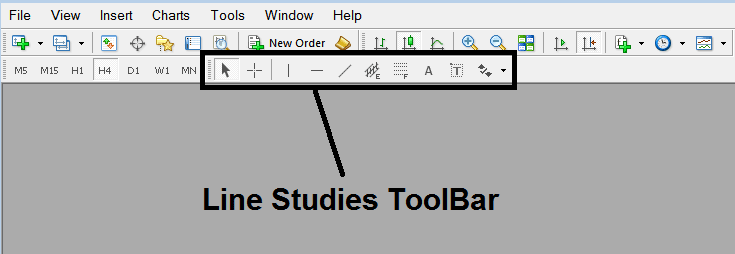
How Do You Interpret Fib Projection on MetaTrader 5 - How to Interpret Fibonacci Projection in MetaTrader 5?
2. Customize Line Studies Toolbar - Set Up Fib Projection Settings in MetaTrader 5?
Rightclick the Customize button (displayed below) >>> A drop-down menu pops up, Select Customize >>>
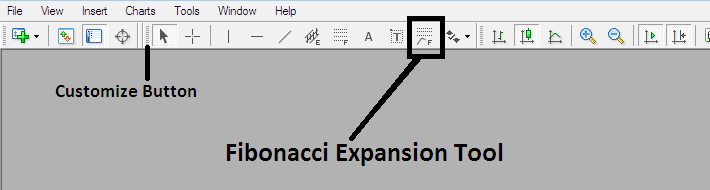
How Do You Interpret Fib Projection on MetaTrader 5 - How to Interpret Fibonacci Projection in MetaTrader 5?
3. Place This Tool in MT5 Gold Trading - Set Up Fib Projection Setting in MT5?
Select the Fibonacci Projection trading gold indicator tool from the popup window that will then appear >>> Click Insert button >>> Click Close. (MetaTrader 5 Fibonacci Projection Settings Shown Below)
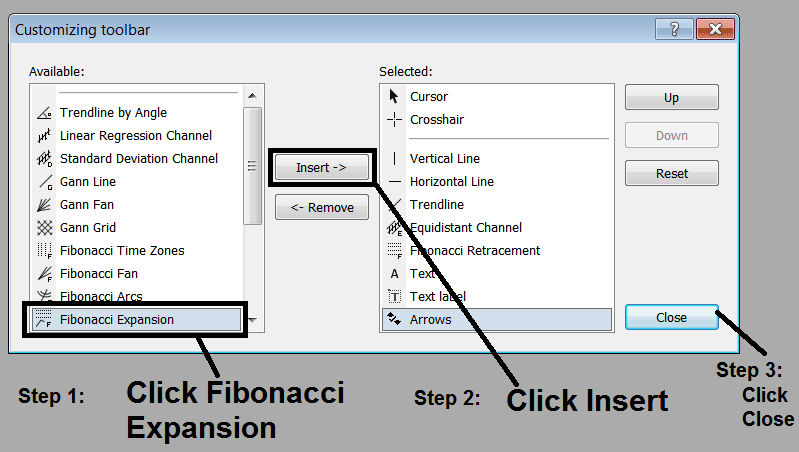
How Do You Analyze XAUUSD MT5 Fibonacci Projection Settings on MetaTrader 5
4. Fibo Projection Tool Added - Set Up MetaTrader 5 Fib Projection Settings in MetaTrader 5?
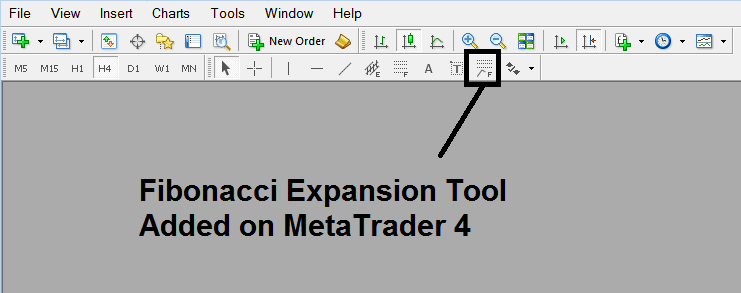
Interpret Fibonacci Projection Settings in MT5 - How to Trade Fibonacci Projection Settings on MetaTrader 5?
As a trader you can then use the above MT5 Fibonacci Projection Tool Button to place the MT5 Fibonacci Projection trading gold indicator on the MT5 trading gold chart and to change the settings of the MT5 Fibonacci Projection trading gold indicator on the trading gold chart you can right click in Fibonacci Projection trading gold indicator & choose the indicator properties settings button from the menu that appears and from this MT5 Fibonacci Projection trading gold indicator properties settings window you can then change the MT5 Fibonacci Projection technical indicator settings for the MT5 Fibonacci Projection Trading XAUUSD Indicator Tool.
Interpret Fibonacci Projection on MetaTrader 5




