How Do I Add a Downloaded MT5 XAUUSD EA on MT5?
How Do I Add a Downloaded MT5 XAUUSD EA on MT5 Software Platform?
Trading Gold Install a Downloaded EA on the MT5 Software?
Procedure for installing a Downloaded EA in MetaTrader 5 software is described below:
How to Add a Downloaded Gold Trading Expert Advisor
If you download an automated xauusd trading Expert-Advisor robot from a source on the inter-net, for examples from www.tradegoldtrading.com, then it is now on your PC computer, to add it, follow the steps below so as to install the Automated EA on your MetaTrader 5 platform:
Step1 : On the File Menu of Meta-Editor, Select "Open"
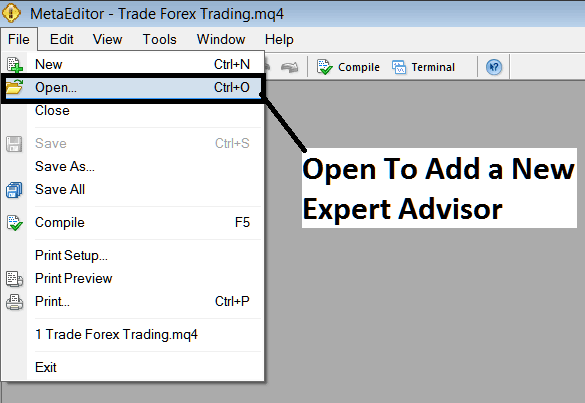
How to Add a Downloaded MT5 XAUUSD Expert Advisor in MetaTrader 5
Step2: Find Download Folder from the Popup panel which pops up as illustrated below
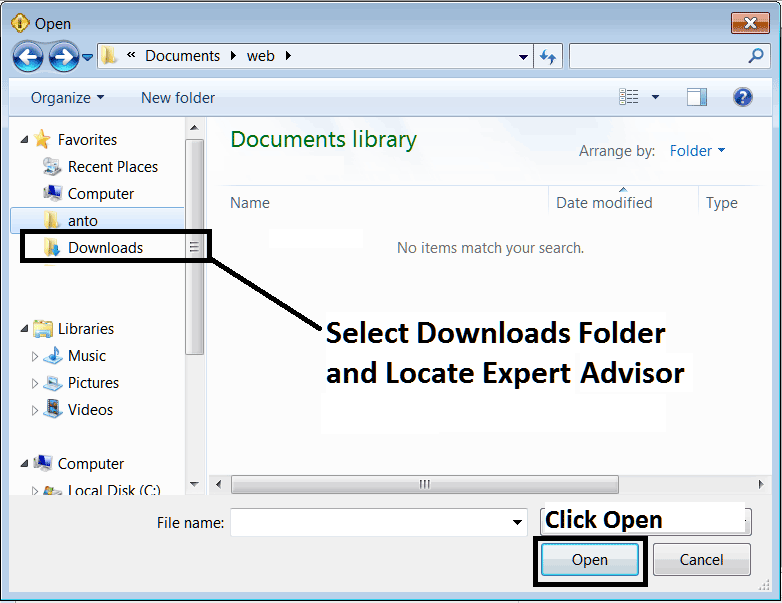
Interpret and Add a Downloaded MT5 XAUUSD EA in MT5 Gold Trading?
Step3: Once you Open the Expert Advisor it will be displayed on the MT5 MetaEditor and then follow the procedure for compiling Robots on MT5, once it is compiled without errors, Restart Your MT5 Gold Trading Platform & the automated EA robot will now be added to the MT5 platform and you can start to trade with it on your MT5 Gold Platform.
How to Add a Downloaded MT5 XAUUSD Expert-Advisor in MetaTrader 5




