How Do I Place Fibonacci Extension Levels on MetaTrader 5?
XAUUSD Trading Place Fibo Extension Levels on MetaTrader 5
Setting up Fibonacci Extension Levels on MetaTrader 5
The xauusd trading step by step tutorial below explains how to draw Fibo Extension Levels and how to use this Fibo Extension Levels Technical Indicator.
Place Fibonacci Extension Levels Indicator on MetaTrader 5
Steps of Adding Fibonacci Extension Levels Indicator on MetaTrader 5: Fibonacci Extension Levels indicator is not displayed by default on MetaTrader 5 settings - if the Fibonacci Extension Levels Indicator does not appear on your MT5 platform - then locate the 'MetaTrader 5 Line Studies Toolbar' as shown below and follow the procedure below to add the Fibonacci Extension Levels Gold Indicator:
1. MT5 Line Studies Toolbar - Place Fibonacci Extension Levels Indicator in MT5?
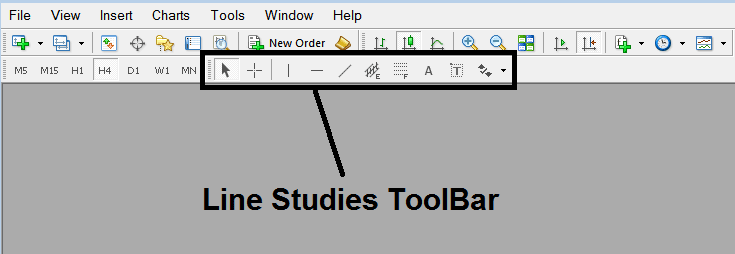
Place Fib Extension Levels in MT5
2. Customize Line Studies Tool bar - Place Fibonacci Extension Levels Indicator in MetaTrader 5
Right-click the Customize button key (shown below) & a drop-down menu appears, Choose Customize
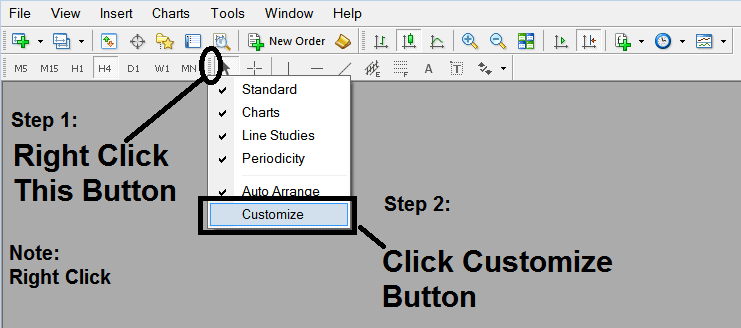
Place Fib Extension Levels in MT5
3. Place This Fibonacci Extension Levels Indicator on MetaTrader 5 - How Do I Add Fibonacci Expansion Indicator in MetaTrader 5
Select the Fibo Expansion Indicator from the popup panel which appears & Click Insert button and then Click Close.(As Described Below)
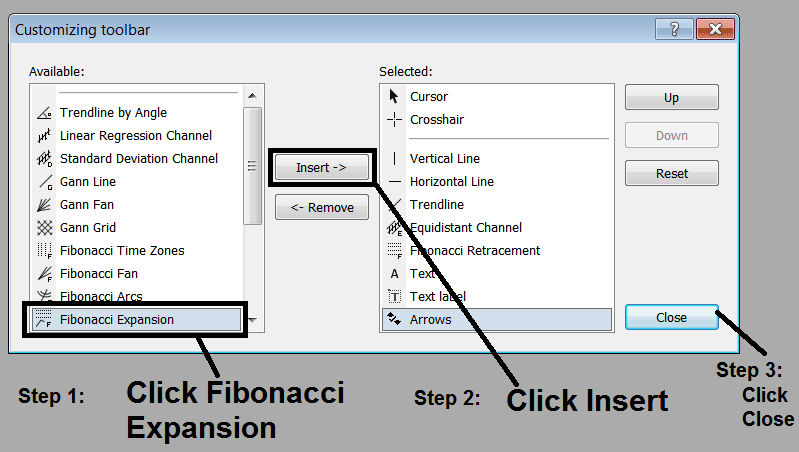
Gold Place Fibo Extension Levels in MT5?
4. Fibonacci Expansion Indicator Added in MT5
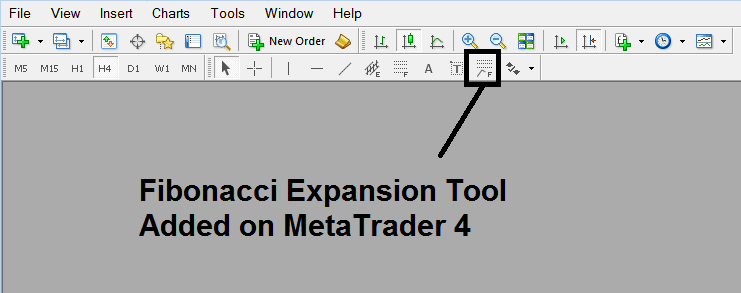
Gold Place Fibo Extension Levels in MT5?
Interpret and Place Fibonacci Extension Levels on MetaTrader 5




