Metals Trading Pivot Points
Pivot points is a set of indicators developed by floor traders in the commodities markets to determine the potential turning points, also known as "pivots". These points are calculated to determine levels in which the sentiment of the metals trend could change from "bullish" to "bearish." Metals traders use these points as markers of support and resistance.
These points are calculated as the average of the high, low & close from the previous session:
Metals Pivot Point = (High + Low + Close) / 3
Day traders use the calculated pivots to determine levels of entry, stops & profit taking, by trying to determine where the majority of other metals traders may be doing the same.
A pivot is a metals price level of significance in technical analysis of a financial market that is used by metals traders as a predictive indicator of metals price movement. It is calculated as an average of significant metals prices (high, low & close) from the performance of a market in the prior trading period. If the metals prices in the following period trades above the central point it is usually evaluated as a bullish sentiment, whereas if metals price below the central point is seen as bearish.
The central point is used to calculate additional levels of support and resistance, below & above central point, respectively, by either subtracting or adding metals price differentials calculated from previous trading ranges.
A pivot and the associated support & resistance levels are often turning points for the direction of metals price movement in a market.
- In an up metals trend, the pivot point and the resistance levels may represent a ceiling level for the metals price. If metals price goes above this level the up metals trend is no longer sustainable and a metals trend reversal may occur.
- In a down metals trend , a pivot point and the support levels may represent a low for metals price level or a resistance to further decline.
Central pivot can then be used to calculate the support & resistance areas as follows:
Pivot points consist of a central point level surrounded by three support levels below it and three resistance levels above it. These points were originally used by floor traders on equity and futures exchanges because they provided a quick way for those traders to get a general idea of how the metal market was moving during the course of the day using only a few simple calculations. However, over time they have also proved exceptionally useful in other markets as well.
One of the reasons they are now so popular is because they are considered a "leading" (or predictive) technical indicator rather than a lagging indicator. All that is required to calculate the pivot points for the upcoming (current) day is the previous day high, low, and close metals prices. The 24-hour cycle pivot points in this indicator are calculated according to the following formulas:
Central pivot can then be used to calculate the support & resistance areas as follows:
Resistance 3
Resistance 2
Resistance 1
Pivot Point
Support 1
Support 2
Support 3
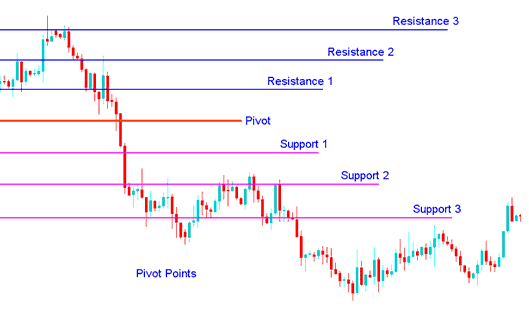
Pivot Points Support and Resistance Areas
Pivot Points as a Metal Trading tool
The pivot point itself represents a level of highest resistance or support, depending on the overall sentiment. If the metal market is direction-less ( range bound ) metals prices will often fluctuate greatly around this level until a metals price breakout develops. Metals Prices above or below the central point indicates the overall sentiment as bullish or bearish respectively. This metals indicator is a leading Metal indicator that provides signals of potentially new highs or lows within a given chart time frame.
The support and resistance levels calculated from the central pivot point and the previous market width may be used as exit points of the open Metals trades, but are rarely used as entry signals. For example, if the metals price is up-trending and breaks through the pivot point, the first or second resistance level is often a good target to close a position, as the probability of resistance and reversal increases greatly, with every resistance level.
In pivot-point analysis 3 levels are commonly recognized above & below the central point. These are calculated from the range of metals price movement in the previous trading period & then added to the central point for resistances and subtracted from it for support levels.
Pivot Points
Pivot levels can be used in many different ways. Here are a few of the most common methods for utilizing them:
Metals Trend Direction: Combined with other Metals analysis techniques such as overbought/oversold oscillators, volatility measurements, etc., the central point may be useful in determining the general trending direction of the market. Trades are only taken in the direction of the Metals trend. Buy trades occur only when the metals price is above the central point and sell metal trades occur only when the metals price is below the central pivot.
Metals Trading Price Breakouts: In metals price breakouts, a bullish buy metals signal occurs when the metals price breaks up through the central point or one of the resistance levels (typically Resistance 1). A short sell metals signal occurs when metals price breaks down through the central point or one of the support levels (typically Support 1).
Metals Trend Reversals: In metals trend reversals, a buy metals signal occurs when the metals price moves towards a support level, gets very close to it, touches it, or moves only slightly through it, and then reverses and starts moving in the other direction.
To download Pivot points:
https://c.mql5.com/21/9/pro4x_pivot_lines.mq4
Once you download it open it with MQL4 Language Meta Editor, Then Compile the technical indicator by pressing Compile Button Key and it'll be added to your MT4.
Note: Once you add it to your MT4, the indicator has additional lines named Mid Points, to remove these additional lines open the MQL4 Language Meta Editor(shortcut keyboard key - press F4), and change line 16 from:
Extern bool midpivots = true:
To
Extern bool midpivots = false:
Then Press the Compile button again, and it'll then appear as exactly shown on www.tradegoldtrading.com web site.