Gold Trading Load a MetaTrader 4 Gold Profile on MT4
How Do I Load a MT4 XAUUSD Profile on MT4?
MetaTrader 4 Gold Trading Software Platform Tutorial Guide - How Do I Load a XAUUSD Chart Profile? - MetaTrader 4 Gold Chart Default Chart Work Space
Open the MT4 platform you wish to create a gold chart profile for. Once you are ready to open the MT4 Gold Charts Saved Profile.
- Click 'File' Menu.
- Select 'Profiles'.
- Select "Load Profile".
- Enter the name of "Saved Profile".
Sign in to MetaTrader 4 software & when you want to load the saved "My Work-Space" profile: You will navigate to File Menu>>>Then Click Profiles>>>and Then Choose 'My Workspace'. In the xauusd trading example illustrated and explained below this XAUUSD Chart MT4 Profile is already selected as shown by the check mark/ tick mark. If you wanted to switch to another saved work space, or the default chart work space or another profile for example the profile marked Swiss Franc or Euro in the above MT4 Gold Chart Workspace example, then you would just click on name of profile that you want and then load it on the MetaTrader 4 platform.
Examples of how to save a work-space named "My Work-Space"
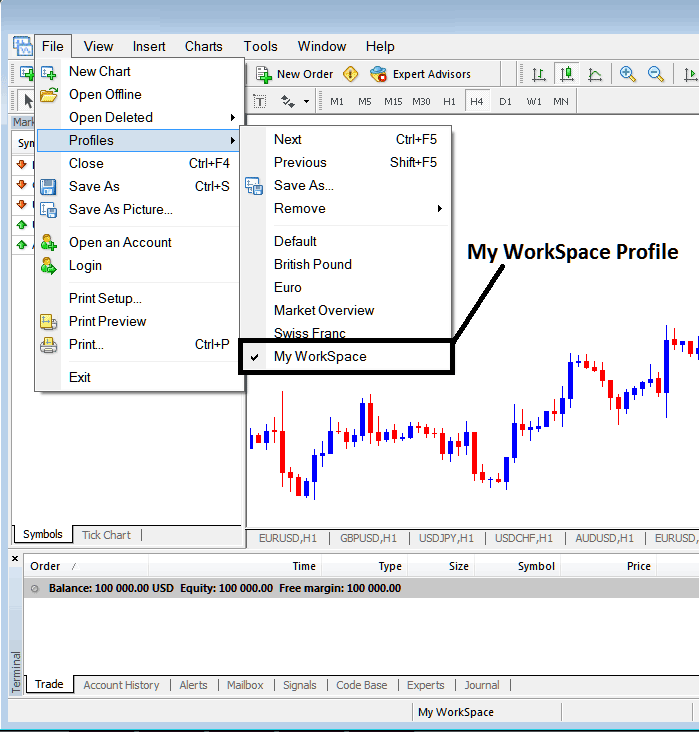
How Do You Load a XAUUSD Chart Profile - MT4 Gold Chart Profile Workspace
Loaded work space 'My Workspace' is also displayed at the bottom center of MetaTrader 4 software: (below the 'Experts' tab, at the middle bottoms position of MetaTrader 4 software as displayed above).
Another shortcut to load this gold charts 'profiles' is using this button key at the bottom-center position of MT4 software as displayed below.
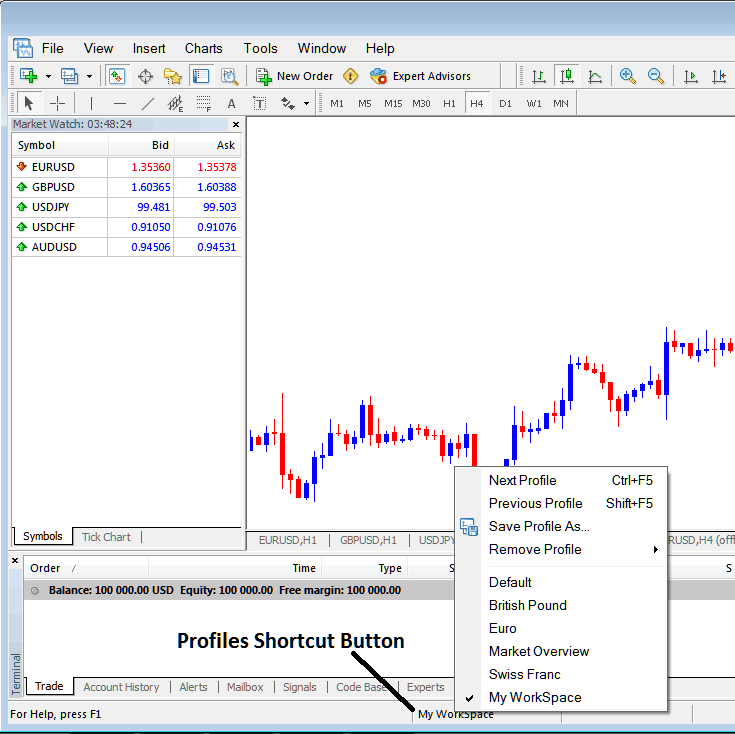
Gold Trading Load a MetaTrader 4 Gold Profile on MT4 - Trading Gold Load a MT4 Gold Profile on MT4?
From this MT4 platform tutorial, now as a trader you have learned how to load a work space using the MT4 profiles button on the MT4 platform, under the file drop down menu and you can now load any profile you want on yourMetaTrader 4 platformby choosing any of the saved profiles in the MetaTrader 4 software that you may require to trade with on your xauusd trading charts.
Trading Gold Load a MT4 Gold Profile in MetaTrader 4




