Gold Trading Save a MT4 Gold Profile on MT4
How Do I Save a MT4 XAUUSD Profile on MT4?
MetaTrader 4 Gold Software Tutorial - How Do I Save a XAUUSD Chart Profile
Open the xauusd charts you wish to create a profile for on MT4. Once you setup the xauusd charts and you are ready to save these MetaTrader 4 gold charts as a gold chart template.
- Click "File" Menu.
- Select "Profiles".
- Select "Save Profile".
- Enter the name of the "New Profile".
MetaTrader 4 XAUUSD Chart Default Chart Template
In MT4 gold trading platform, you might want to save a work space that you have opened, especially if you have come to a learn gold tutorial site like this one that has shown you how to place gold indicators & how to open many gold charts & put various gold tools on these gold charts and you want to continue trading tomorrow from where you left of, then this saving your xauusd platform profile work space guide will show you how to do it.
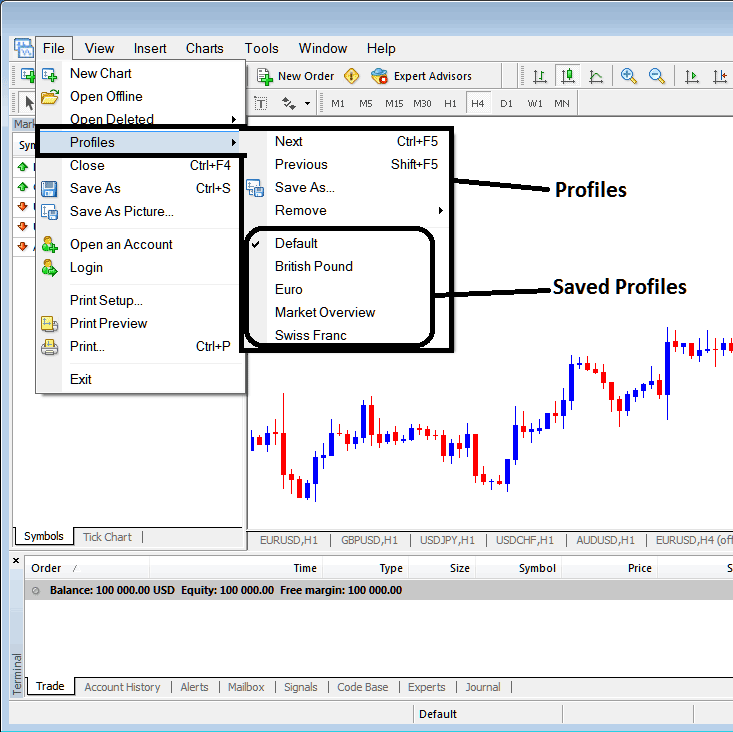
To save a work space on MT4 gold trading platform you will use the "Profiles" button key, which is the fourth option on the "File" dropdown menu list - this MetaTrader 4 platform button is shown below:
Gold Trading Save a MT4 Gold Profile on MT4 - Trading Gold Save a MT4 Gold Profile on MT4?
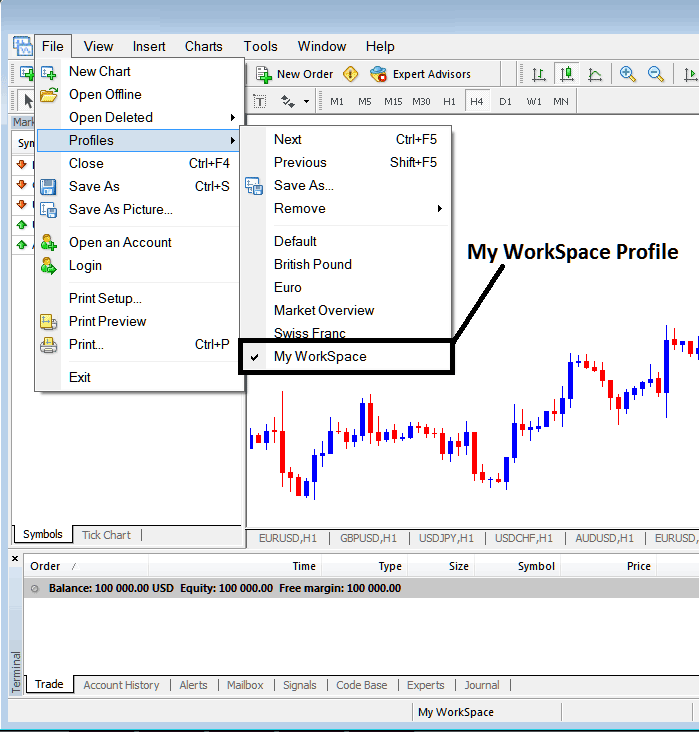
From the above profile button, once you click this button key on the MT4 software, another sub menu appears to the right as shown above, to save your current work space on MT4 as a profile, click "Save As" button key shown above on MT4 platform & name your profile, for example you can call it "My Work-Space"
Examples of how to save a MT4 XAUUSD Chart profile named "My Work-Space"
Interpret and Save MT4 Gold Profile on MT4? - How Do I Trade XAUUSD and Save a MT4 Gold Profile on MT4?
From this learn MT4 platform tutorial, now as a trader you have learned how to save a MT4 work space using the profiles button on the MT4 platform, under the file drop down menu and you can now save as many MT4 gold chart profiles as you want on yourMetaTrader 4 softwareand then select any of these saved profiles any other time that you might require to trade with them on other xauusd charts that as a trader you are trading with.
Trading Gold Save a MT4 Gold Profile in MetaTrader 4




