How Do I Use XAUUSD MT4 Learn Gold Platform Tutorial?
Informative MT4 XAUUSD Lesson for XAUUSD Trading Beginner Traders
To start gold trading with the MetaTrader 4 platform, you need to follow steps listed below:
XAUUSD Account MT4 Download
Setup MT4 Gold Platform on Your PC. Open a xauusd trading account on the MT4 platform. Log in to the MT4 XAUUSD Account with your xauusd trading account login credentials Open XAUUSD Charts and place Gold Trades using the MT4 Platform.
XAUUSD Account MT4 Download
After you Download MT4 Gold Trading Platform from your gold broker you will then need to open a MT4 Gold Account to trade with.
Trading XAUUSD Open a Demo Account using MT4 XAUUSD Trading Platform
- Download MT4 Gold Software - MT4 Platform.
- Setup MetaTrader 4 Platform.
- Open the MT4 Platform.
- Enter the Log in Details: Account Name & Password for the Demo Trade Account
- Open XAUUSD Charts & begin practice trading.
- If you do not have a gold demo account you can register for a demo trade account using File menu, Click New Practice Account Registration and enter your details and sign up for an MT4 xauusd trading account.
Trading XAUUSD Open a Real Account in MT4
- Download MT4 Gold Trading Platform
- Setup MT4 Gold Trading Platform on your PC Computer.
- Open the MT4 Gold Trading Platform on your PC Computer.
- Click on the File Menu and Select Open an Account.
- Select The Real Trading Account Option.
- Fill in the real gold trading account opening form.
- Enter you xauusd account sign in credentials for the Demo practice account.
- Trade Gold from the free MT4 gold charts provided.
MT4 Gold Platform Introduction Tutorial
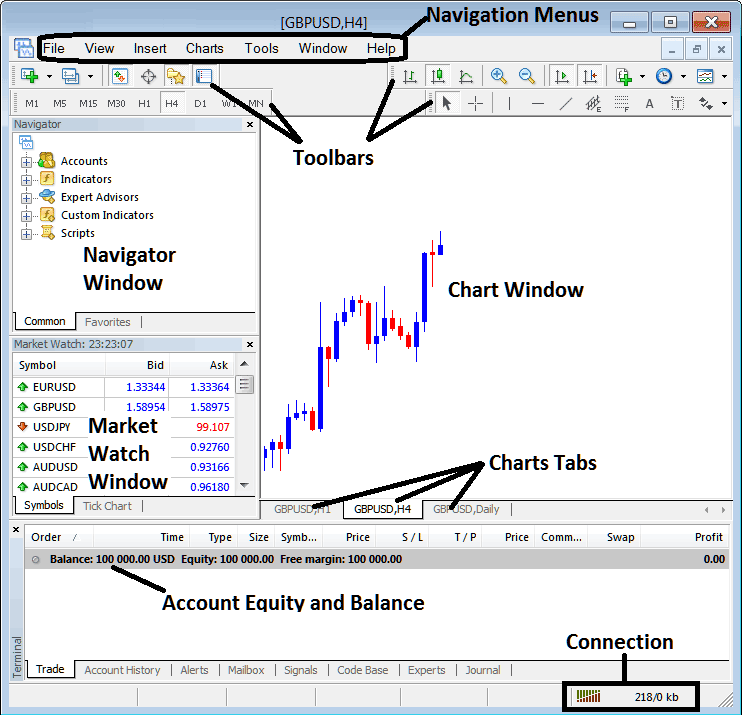
The following image below shows the main MetaTrader 4 platform inter-face. As a beginner trader trying to learn how to execute gold orders in the online gold market, the main tool for trading the online gold market is the MetaTrader 4 platform software. This is the software that you will connect to your online gold broker and execute gold trade transactions & monitor your gold trading account balance from this MT4 platform software.
The MT4 platform is provided for free through the various XAUUSD broker websites. This MetaTrader 4 platform looks like the xauusd trading example illustrated and explained below:
How Do You Use XAUUSD MT4 Learn Gold Platform Tutorial? - How to Use MT4 Gold Guide
Main Areas of this MT4 software as displayed above are:
- Navigation Menus
- Toolbars
- Chart Window
- Navigator Window
- Market Watch Window
- Terminal Window
- Connection Bars
For this MetaTrader 4 platform guide we shall look at a brief introduction for each of these how to use MT4 platform guides:
1. Navigation Menus
The navigation menus are:
- File
- View
- Insert
- Charts
- Tools
- Window
- Help
These are main navigation menus which can be used to navigate MetaTrader 4 platform. As a gold beginner trader you can begin by just clicking any of these navigation menus to familiarize yourself with various buttons that are arranged as sub-menus within these navigation menus.
These navigation menus will be explained in details in the next MT4 software tutorial for gold novice traders about navigation menus.
2. Tool-Bars
This how to trade in MT4 explains the tool bars are used to manipulate trading charts, either by placing indicators, line studies, change gold chart time frames and load an MT4 template from a list of saved templates.
These MT4 gold tool bars will be discussed on other how to use MT4 gold guides which will outline each button on this tool-bar & how to add and customize these tool-bars.
3. Chart Window Panel
This is the main area where gold charts are displayed and a trader can analyze the trend direction of a gold chart whether up or down, place MT4 indicators on MT4 gold charts for technical analysis and even place orders from these xauusd trading charts.
4. Navigator
Navigator MT4 platform tutorial will contain information about gold accounts, whether demo MT4 gold trading account or real MT4 gold account, this window will also have a list of all the MT4 indicators as well as Expert-Advisors & scripts.
A trader can select which Gold account to login to by expanding the Accounts menu, select an technical indicator by expanding the indicator menu or choose an EA by expanding the Expert Advisor menu.
5. Market Watch
Market watch MT4 gold tutorial - Market watch is used to show streaming quotes for trading instruments. This window can list as many quotes provided by your XAUUSD broker or a few that are selected by a trader. To save internet bandwidth, right click inside the xauusd market watch window panel & select 'Hide All', so as to hide the trading instruments that you are not trading & save on internet bandwidth.
6. Terminal
This is the panel that's like the bank account trade area for your gold trade transactions, on this window you can view your gold trading account balance, gold profit & losses statement, gold equity, gold margin used also retrieve a copy of all your gold transactions history.
This will also list all open gold trade transactions & calculate all the profit & loss in realtime as the xauusd price move up or down.
7. Connection Bar
Red bars are for no connectivity, green bars show that there is connectivity to the servers & gold trade orders can be set. These connection bars should always be green when one is logged into their MetaTrader 4 practice gold account or MT4 live xauusd trading account.
These main areas form the MT4 Gold Platform interface & will be the main areas to be covered in detail in the next learn MT4 platform tutorials. For now it is best to download MT4 software and familiarize yourself with the software interface.
Why XAUUSD Software is Required for Placing Gold Symbol Trade trade transactions with Brokers
Gold software is software that is used to access the gold market and analyze xauusd price movement using technical analysis gold charts. There are various reasons why a trader requires to use a good gold platform. A good gold platform can determine if a as a trader you make a profit or not.
So why does a trader need a good Gold platform:
To connect to the Trading Server:
To place order a trader needs to use a gold platform which will connect to the trading servers of their broker & allow them to open & close trade orders. Good gold platforms will connect with ease to the brokers' servers & allow xauusd traders to place orders at any time from their computer.
To analyze xauusd charts using technical analysis
To open buy or sell order one needs to first interpret direction of a gold. This is why all good gold platforms provide technical gold tools such as xauusd price charts, technical indicators & various different chart time-frames from which a trader can analyze xauusd price moves using the chart timeframes of their choice.
How to Use MT4 Gold Software Guide for Gold Beginners
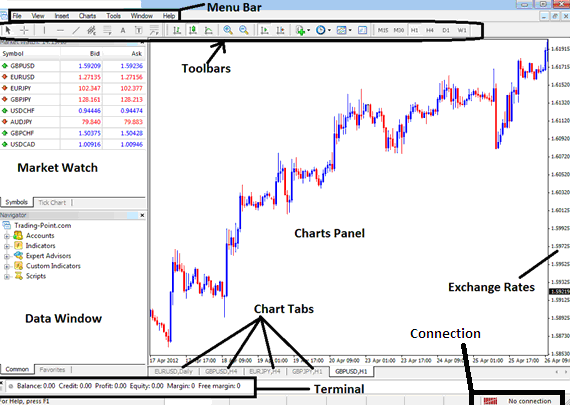
From above MetaTrader 4 platform interface, the summary of all data required by a trader is provided on this MetaTrader 4 platform interface
- Connection - connectivity to the broker servers
- Charts - price graphs which display xauusd prices
- Toolbars - tool bars to add technical analysis tools & technical analysis technical indicators
- Market Watch - for displaying available trading instruments
- Data window - provides account data & other indicator data
- Exchange rates - shows current market xauusd price of a xauusd trading instrument
- Menu bar - Shows all menu items on the platforms
How Do You Use XAUUSD MT4 Platform Tutorial - XAUUSD Account MetaTrader 4 Download
How to Use MT4 Gold Platform for Beginner Traders - Informative MT4 Gold Lesson for Gold Beginners




