How Do I Use Trading XAUUSD TP Gold Orders & Set SL XAUUSD Orders on MetaTrader 4 Platform?
How Do I Use TP XAUUSD Orders & Set SL XAUUSD Orders on MT4?
How Do I Use Trading Take Profit Gold Order & Stop Loss Gold Orders? - How Do I Use Trading Take Profit Gold Orders and Set Stop Loss Gold Orders in MetaTrader 4
Trading Gold Set Take Profit XAUUSD Orders on MetaTrader 4 Platform
Trading Gold Set Take Profit XAUUSD Order on MetaTrader 4 Platform
Set Take Profit Gold Orders When Opening XAUUSD Orders in MetaTrader 4
To set Take Profit Gold Order when opening a new gold order in MetaTrader 4 software use the step by step procedure described below:
Set Take Profit Gold Order When Opening New XAUUSD Order in Tools Menu in MetaTrader 4 Platform
To open a new gold order to buy or sell a trade use tools menu within MT4 Platform as shown below.
The New gold order button for placing a new gold trade is displayed below. (MetaTrader 4 Keyboard ShortCut Keys "F9")
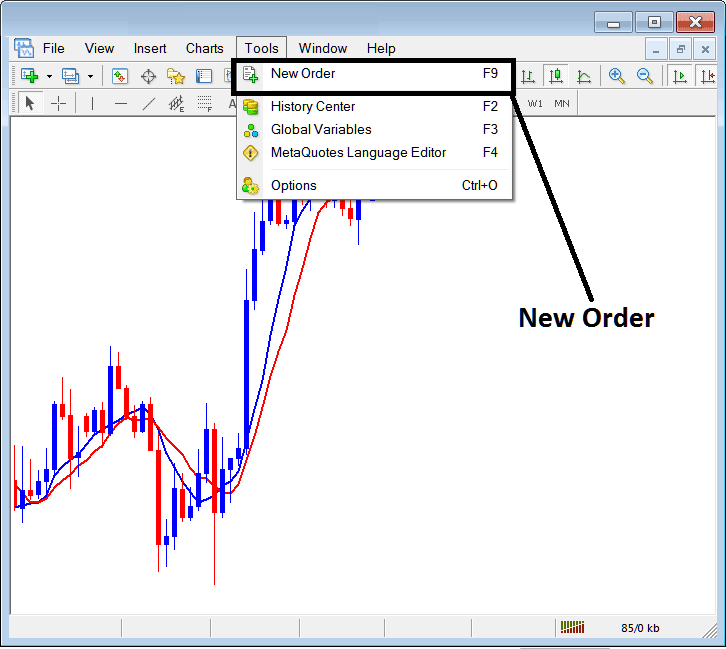
How Do You Use Trading Gold TP XAUUSD Orders & Set SL XAUUSD Orders on MT4?
Once you select the new gold order button as illustrated and illustrated above the following gold trade order pop up window will pop-up and as a trader you will then use this trade order popup window to set the Take Profit Gold Order Level for your new xauusd trade transaction.
This pop up includes the settings for placing a new gold trade order as well as settings for setting Take Profit Gold Order Level.
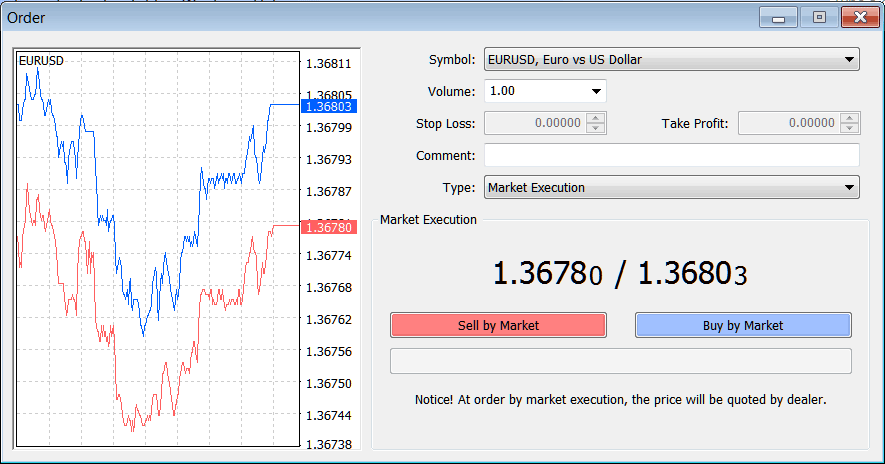
How Do You Use Trading Gold TP XAUUSD Orders & Set SL XAUUSD Orders on MT4?
Following Take Profit Gold Order Setting are specified for placing a new take profit xauusd trade order:
Take Profit XAUUSD Order - Set Take Profit Gold Order, This option can be set after opening the trade, or for pending gold orders
Open the Buy or Sell Gold Trade by Clicking the Following Button Keys:
- Sell by Market - Open a Sell Gold Trade
- Buy by Market - Open a Buy Gold Trade
To Buy at current xauusd price & open new gold order select the Buy by Market gold order button
To Sell at current xauusd price & open new gold order select the Sell by Market gold order button
After you open the new trades use the Take Profit Gold Order Panel Above to Set the TP order for the New XAUUSD Order.
You can also get this panel in order to modify an already open buy or sell gold trade - To find this order window for a buy gold trade, right-click in the opened buy or sell gold trade, then after that click "Modify Order" button after you click the modify order button the above trading order settings button key will appear and you can then set the Take Profit Gold Order using the procedure described above.
Trading Gold Set Stop Loss XAUUSD Orders on MetaTrader 4 Platform
Trading Gold Set Stop Loss XAUUSD Order on MetaTrader 4 Platform
Set Stop Loss Gold Orders When Opening XAUUSD Orders in MetaTrader 4
To set Stop Loss Gold Order when opening a new gold order in MetaTrader 4 software use the step by step procedure described below:
Set Stop Loss Gold Order When Opening New XAUUSD Order in Tools Menu in MetaTrader 4 Platform
To open a new gold order to buy or sell a trade use tools menu within MT4 Platform as shown below.
The New gold order button for placing a new gold trade is displayed below. (MetaTrader 4 Keyboard ShortCut Keys "F9")
Interpret and Use TP XAUUSD Orders & Set SL XAUUSD Orders on MT4? - How Do I Trade Gold and Use TP XAUUSD Orders & Set SL XAUUSD Orders on MT4?
Once you select the new gold order button as illustrated and illustrated above the following gold trade order popup panel will appear and as a trader you will then use this trade order popup panel to set the Stop Loss Gold Order Level for your new xauusd trade transaction.
This pop up includes the settings for placing a new gold trade order as well as settings for setting Stop Loss Gold Order Level.
Interpret and Use TP XAUUSD Orders & Set SL XAUUSD Orders on MT4? - How Do I Trade Gold and Use TP XAUUSD Orders & Set SL XAUUSD Orders on MT4?
Following Stop Loss Gold Order Setting are specified for placing a new Stop Loss Gold Order:
Stop Loss XAUUSD Order - Set Stop Loss Gold Order, This option can be set after opening the trade, or for pending gold orders
Open the Buy or Sell Gold Trade by Clicking the Following Button Keys:
- Sell by Market - Open a Sell Gold Trade
- Buy by Market - Open a Buy Gold Trade
To Buy at current xauusd price & open new gold order select the Buy by Market gold order button
To Sell at current xauusd price & open new gold order select the Sell by Market gold order button
After you open the new trades use the Stop-Loss Gold Order Window Above to Set SL order for the New XAUUSD Order
You can also get this panel in order to modify an already open buy or sell gold trade - To find this order window for a buy gold trade, right-click in the opened buy or sell gold trade, then after that click "Modify Order" button after you click the modify order button key the above order settings button key will appear and you can then set the Stop Loss Gold Order using the procedure described above.
How Do You Use TP XAUUSD Orders & Set SL XAUUSD Orders on MetaTrader 4




