Opening an Offline Chart on MetaTrader 4 Platform
In MT4 you may want to open an offline cfd chart & analyze this chart without having it updating in real time. Although it isn't often that a trader wants to open an offline cfd chart, this option is provided for in the MetaTrader 4 cfds software.
Shown below, the File Navigation drop down menu the second option is that of opening an offline cfds chart.
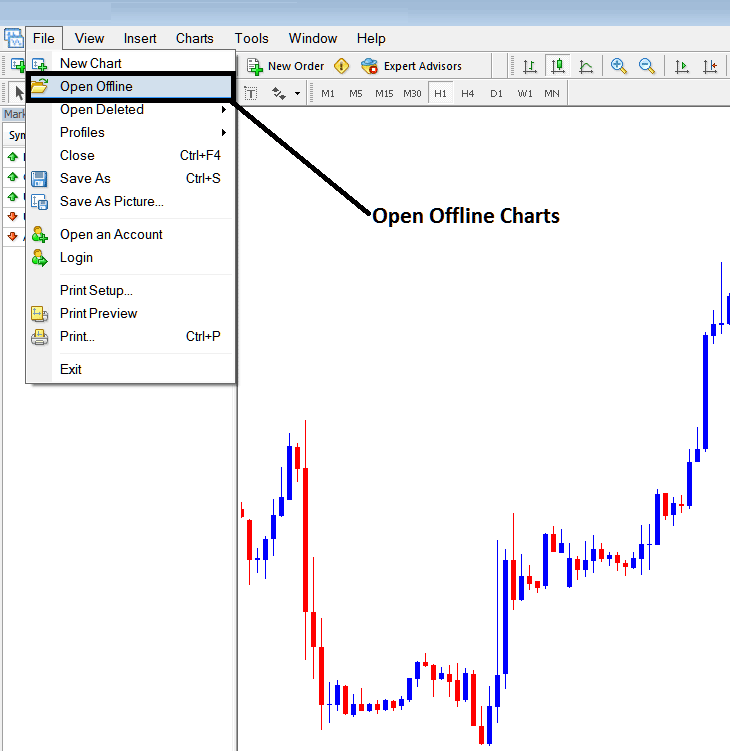
Once a trader clicks the open offline cfd chart a popup panel will appear, a trader can then choose which offline cfd chart to open from this popup menu.
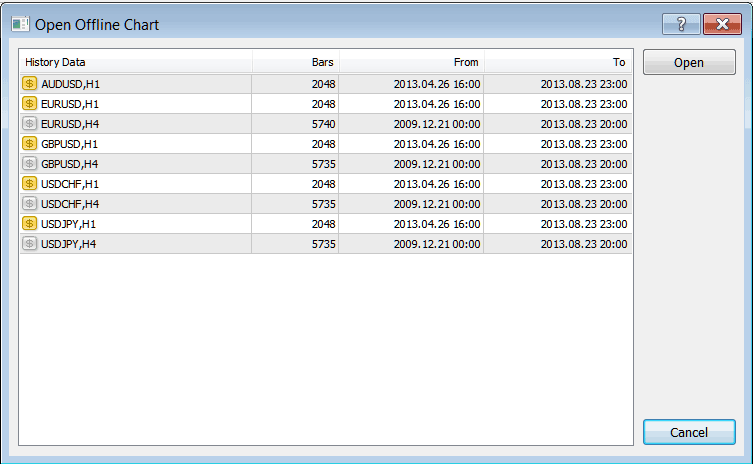
From the above popup menu a trader can then open any offline cfd chart that is listed above, the number of cfds price bars that have been saved within an offline saved chart is recorded as the number of price bars as well as the date from which the chart is saved up to the last time that it was updated.
This option isn't required so much in trading but it's good to explain it for tutorial purposes.