How Do I Add Gold Trading Quotes on MetaTrader 4?
How Do I Add XAUUSD Trading Quotes in MT4?
To add xauusd price quotes on the MT4 platform use the step by step procedure explained below:
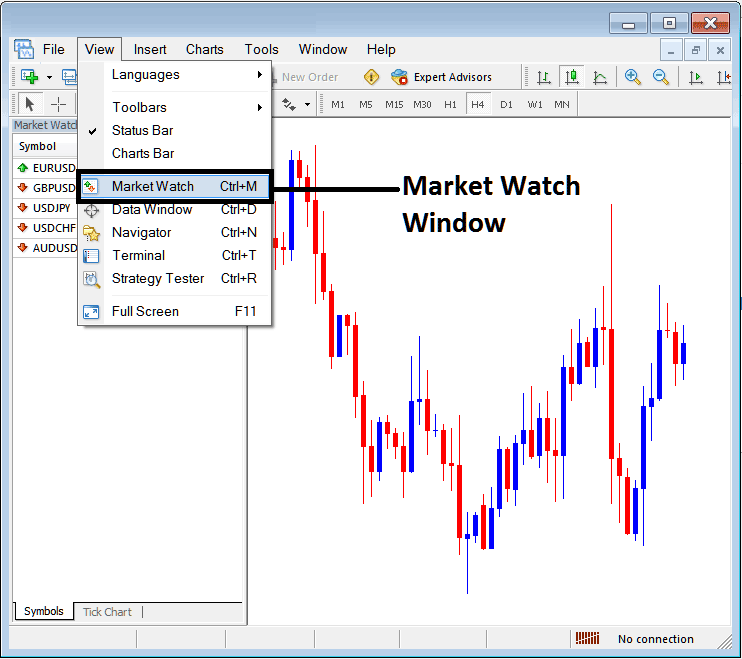
To add more gold trading Quotes on the MT4 platform use the MT4 'Market Watch' Window - To Open the MT4 Market Watch Window, Click 'View' Menu next to 'File' Menu at the top left corner of MetaTrader 4 platform, then from the drop down menu select 'Market Watch' button so as to open the 'Market Watch' on the MT4 software.
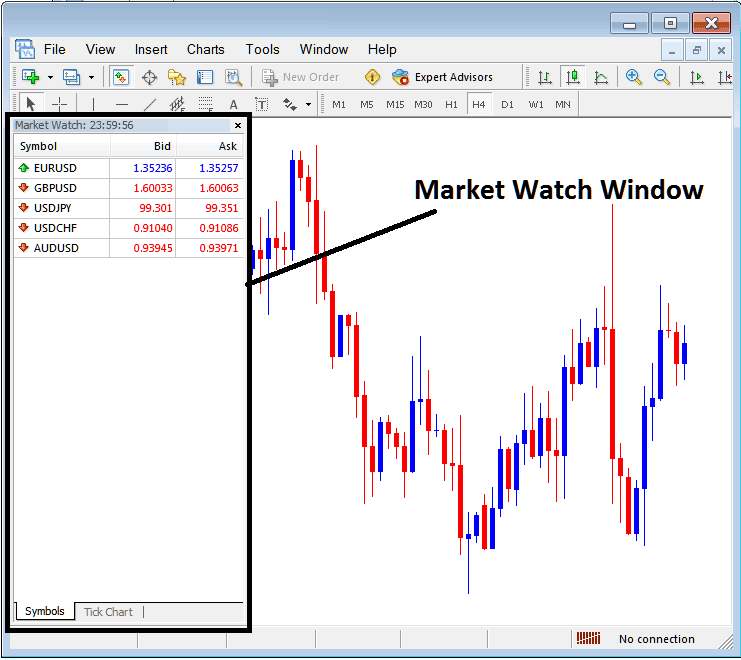
Once you open the Market Watch window panel the list of available trading instrument quotes will be displayed on the MT4 platform and as gold trader you can open a gold chart from this market watch window panel. From this Market watch window you can also add gold quotes symbols on the MT4 software.
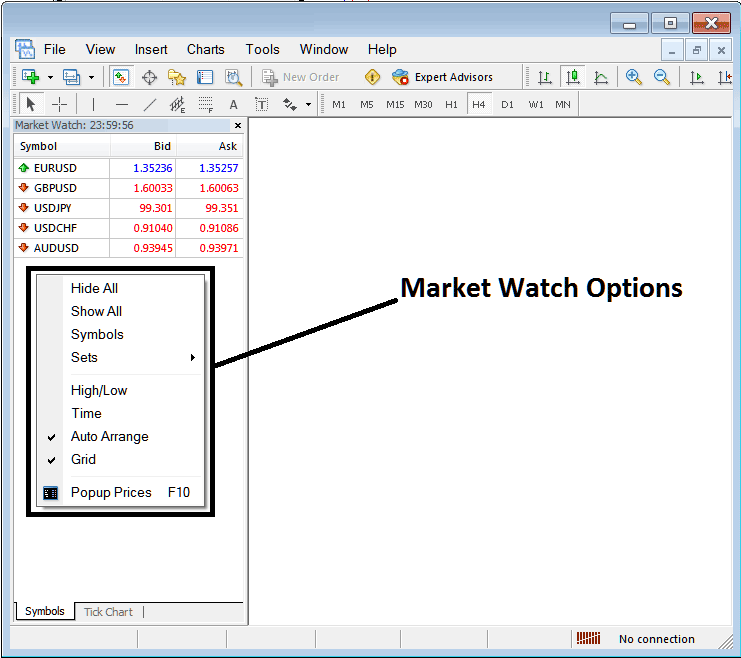
If you want to add more gold Quotes on this Market Watch window, Right Click within the Market Watch window and a Pop Window Panel pops up - from this pop up window panel choose the option - 'Show All' - this will then display all the Instrument Quotes that are available for trading in MetaTrader 4 platform.
Once these Instruments Quotes are opened on Market Watch window, you can then choose any of the gold quote and open a gold chart by double-clicking on that xauusd trading symbol.
To add more gold Quotes on the MT4 platform use the step by step procedure explained below:
MetaTrader 4 Market Watch Window for Adding Gold Quotes on MetaTrader 4 Software
The market watch window panel on MT4 is used to display an array of Quotes for trading instruments.
To access this Market Watch display of symbols on the MT4 Platform a trader should go to the view menu as shown below & select the Market Watch Window by Clicking on it. (The Ctrl+M is the short cut for accessing this window as shown below, by pressing this shortcut, you can enable market watch window without going to the 'view' menu)
Market Watch Window Panel on MT4 for adding Gold Quotes in MT4
How Do I Add Gold Trading Quotes in MT4?
Once a trader selects the xauusd market watch window panel, the following window will appear showing a list of Quotes available for trading.
How Do I Add Gold Trading Quotes on MT4?
As a trader you may also want to trade a instrument quote that is not listed on this MetaTrader 4 instruments quotes list as displayed below.
For examples on the above Quotes list only 5 financial instruments are shown.
To obtain the other financial instruments trading quotes that are not listed, you can right click inside this market watch window as displayed below & the following pop-up window panel will appear. You can then select 'Show All' trading quotes button so as to display all the available instruments quotes on this MetaTrader 4 platform.
Interpret and Add Gold Trading Quotes on MetaTrader 4? - How Do I Add Gold Trading Quotes in MT4?
To show a list of xauusd price quotes, choose 'Show All' button, this will then display all the available trading symbols quotes.
How Do I Add Gold Quotes in MT4 (MetaTrader 4)




