How Do I Add a Downloaded MetaTrader 4 Gold EA on MT4?
How Do I Add a Downloaded MetaTrader 4 XAUUSD Trading Expert Advisor on MT4?
Trading Gold Install a Downloaded EA on the MetaTrader 4 Software?
Procedure for installing a Downloaded Expert-Advisor on MetaTrader 4 platform is described below:
How to Add a Downloaded Gold Trading Expert Advisor
If you download an automated xauusd trading Expert-Advisor robot from a source on the inter-net, for examples from www.tradegoldtrading.com, then it is now on you desktop computer, to add it, follow the steps below in order to install the Automated EA on your MT4 platform:
Step1 : On the File Menu of Meta-Editor, Select "Open"
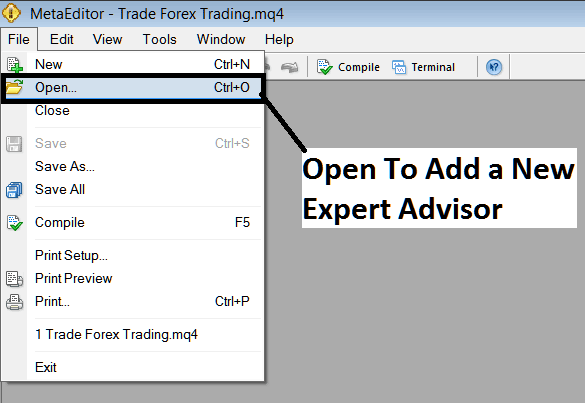
How to Add a Downloaded MT4 Gold Expert-Advisor on MetaTrader 4
Step2: Find Download Folder from the Popup panel which pops up as illustrated below
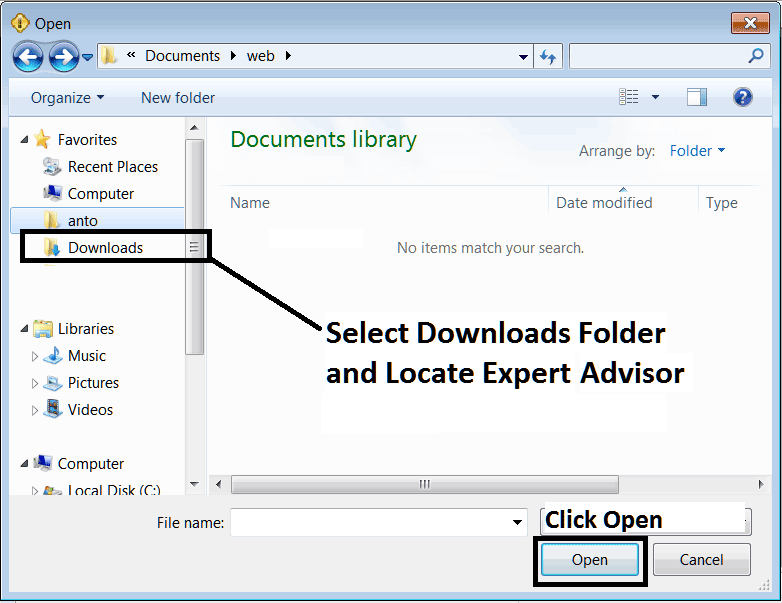
Interpret and Add a Downloaded MetaTrader 4 Gold Expert Advisor on MetaTrader 4?
Step3: Once you Open the Expert Advisor it will be displayed in MetaTrader 4 MetaEditor & then follow the procedure for compiling XAUUSD EA Robots on MetaTrader 4, once it is compiled without errors, Restart Your MT4 Gold Trading Platform & the automated EA robot will now be added to the MetaTrader 4 platform and you can start to trade with it on your MT4 Gold Trading Platform.
How to Add a Downloaded MT4 Gold Expert-Advisor on MetaTrader 4




