MetaTrader 4 Gold Platform Guide
How Do I Login to MetaTrader 4 Platform?
Before placing any trade on the MT4 software, you will be required to sign in to your account and get authenticated before gaining access to the account. Authentication is checking to see if the login details you provide for User Name & Pass Word are the correct sign in details for the account.
To start trading in MT4, just click on "File", then choose and click "Login" button from the file drop down menu as illustrated below.
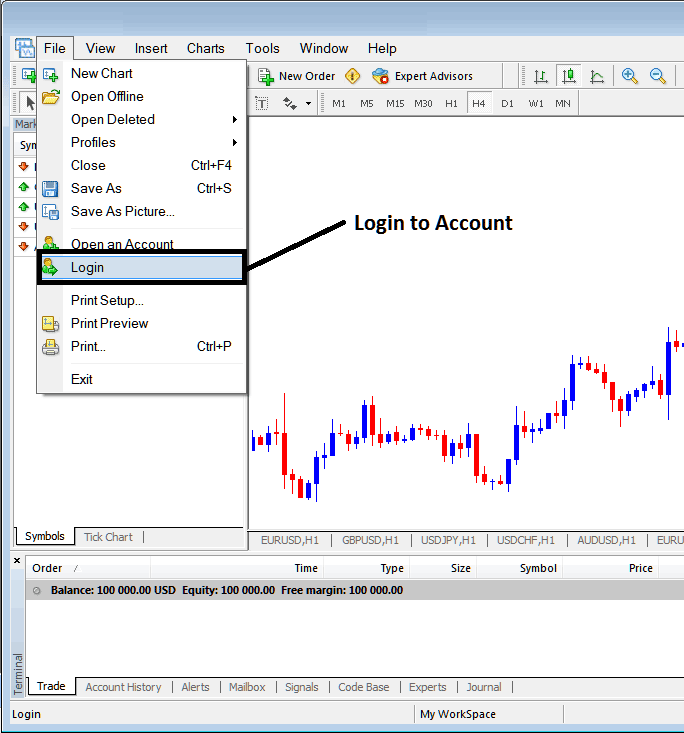
MetaTrader 4 Gold Trading Login Password - MT4 Gold Platform Tutorial
As a trader once you click this log in button key, then a popup window will appear prompting you to put your Username and Password as shown below:
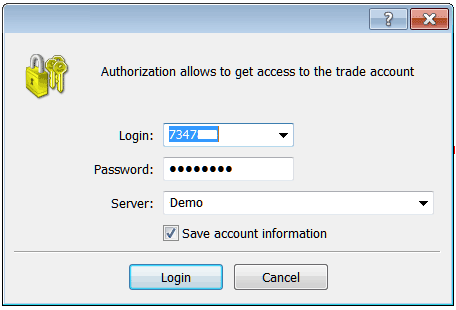
Interpret & Login to MetaTrader 4 Software?
Once you input your User Name and Password you will then have to choose the server: because this is a demo gold trading account, for this instance you'll then choose "Demo", if it was a real XAUUSD account/live Gold account then you would have to select "Real" Server on this option by clicking the drop down arrow on the right side of the above text box.
Then check box "Save Account Information"
Then Click "Sign in"
Once you click login your details will be authenticated & you'll then have access to your MetaTrader 4 xauusd trading account & when logged in to your xauusd account you can begin to trade & place new gold orders in the xauusd market on the MetaTrader 4 platform. If you do not have login details you can get these details by registering a practice trading account with a broker.
Gold Sign in to MT4 Platform




