How Do I Set Buy Limit Gold Order on MetaTrader 4?
How Do I Set Buy Limit XAUUSD Order on MetaTrader 4?
Buy Limit XAUUSD Order on MT4 Platform
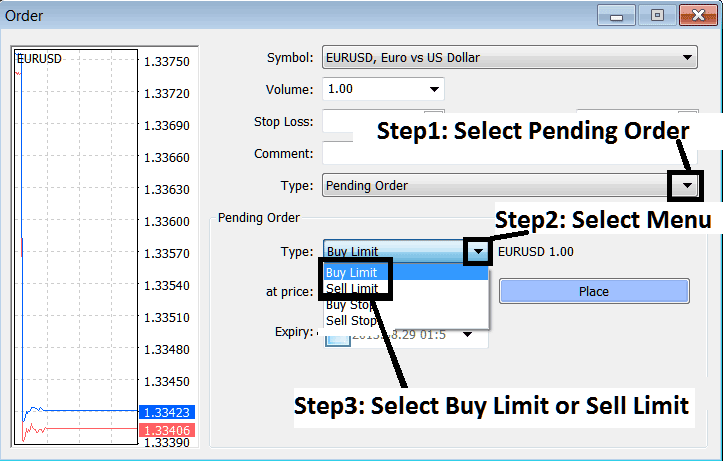
Set Buy Limit Gold Order in MT4
Setting Buy Limit XAUUSD Orders on MetaTrader 4
To set these buy limit orders on MT4 software use the following procedure:
- Right click on xauusd trading chart
- Select 'Trading' Option on the Menu
- Then Choose 'New' Order Option on Popup widow that appears
- Then on trade setup pop up window panel that pops up (illustrated below), under label 'Type' select the option of "Pending XAUUSD Order" instead of 'market execution' trade order
- Under the pending xauusd order options select the pending gold order type: for This trade choose "Buy Limit Gold Order" so as to place a pending buy limit order & after that specify the xauusd price at which you want the buy entry limit gold order executed.
Set Buy Limit Gold Order in MT4




