How to Save MT4 Template Trading System
On MT4, you may want to save the your Stock workspace or the the stock system that you're trading with so as to easily load it the next time you login.
Also Check : Saving a Template on MT4
On the Stocks Platform There are Two Ways For Saving
The Work Space - The workspace is the charts that you have opened along with the information on these charts such as the attached stock trading systems. Saving a workspace will save all this data & you as a trader can use easily load this data any other time in your trading platform software.
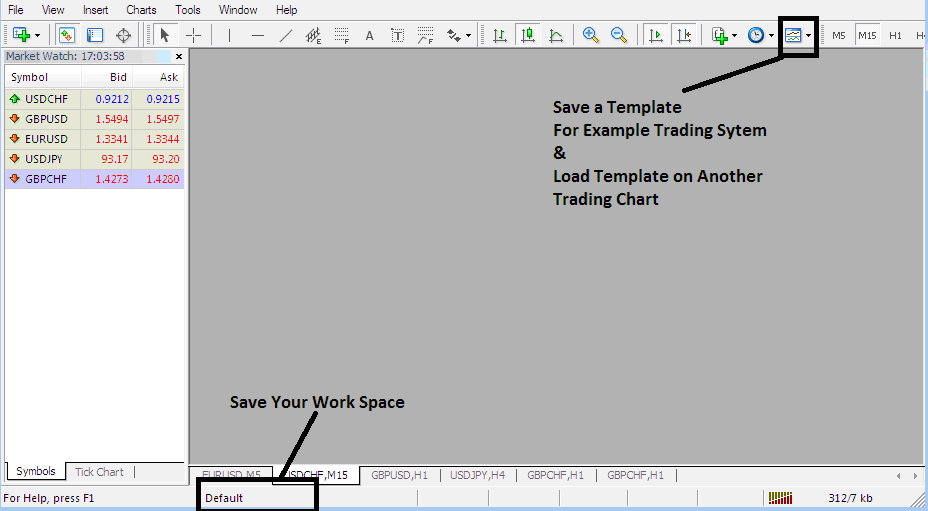
On the workspace button on the MT4 (shown below) a trader can save several different work spaces and load them at another time.
The Template - The template in other words is the stock trading system you are using to trade with. For example you have just placed a set of 4 indicators on your stocks chart, but you also trade other charts & you do not want to redo all the work of putting the same indicators on the other charts all over again, so what do you do? You save it as a template and then load it on the other charts. But how does a trader do this on the Stock Platform MetaTrader 4.
Template and Work Space on MT4 Platform
Saving a Stocks System as a Template MT4
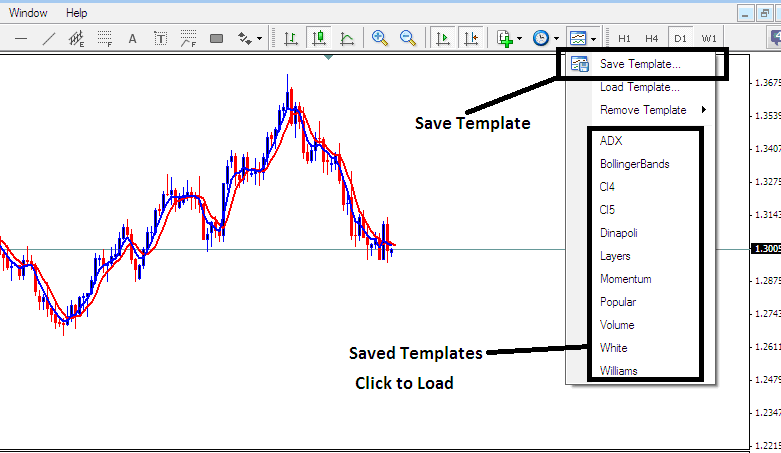
From the screenshot below all a trader has to do is to click the button keys below Templates Icon & select the "Save Templates" Button.
Saving a Template in MT4 Platform
Saving a Template in MT4 Platform - How to Save MT4 Template Trading System
If as a trader you want to save the above stock trading strategy on your MetaTrader 4 stocks trading platform software, click the templates button as shown above, then select "Save Template" as shown above, then specify the "name" of the stocks system & click "okay".
To load a template on another stocks chart, click the "Load Template Button" as shown above, then select the path of where to load the stock trading system from. You can even select to download a stock trading system template, if you have downloaded, or want to select a stock trading template that is saved from another MT4 of another stock broker within your computer drive C: / Programs / MT4 / templates / Name of System.
To load a template, there is a shortcut list of saved templates click on item on the shortcut listed to load it.
Saving a Workspace
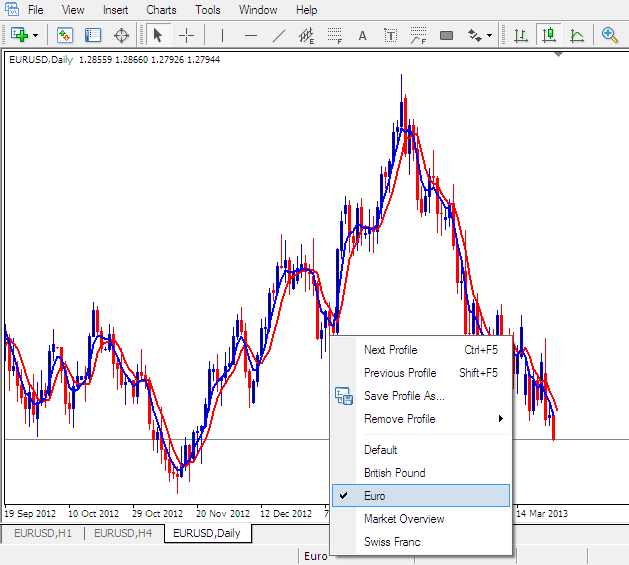
To save a workspace (not a template) which is a collection of the open stocks charts & all the stock indicators attached to these stock charts on the Stock Software, Click the "Save Workspace" button key shown below.
MT4 Stocks Trading Platform Workspace - How to Save MT4 Work Space Stock Charts
Load a Workspace in MT4 Platform
Saving the above Workspace - Click "Save Profile" , and choose the profile with the name "Euro"
To load this Work Space anytime, click the shortcut above that is marked "Euro"
To load the British Pound Workspace , click the above short cut that's marked "British Pound"
When trading stock you can "load" or "save" a template or workspace and then place it on another stock chart by simply clicking on a single platform button provided as shown above, this makes it is easier to trade with the MetaTrader 4 Stock Trading Software.