Chart Tool Bars on MT4 Software
On MT4 "View" menu, the second button on the drop down menu list is the "Toolbars" button. This MT4 toolbars button is used to select the chart tool bars to place on the MT4 interface.
The main toolbars are; Standard Toolbar, Charts Toolbar, Line Studies Toolbar and Periodicity Toolbar as shown below. By clicking the MetaTrader 4 toolbar button, these stock trading toolbars are shown to the right of this "Toolbars" button.
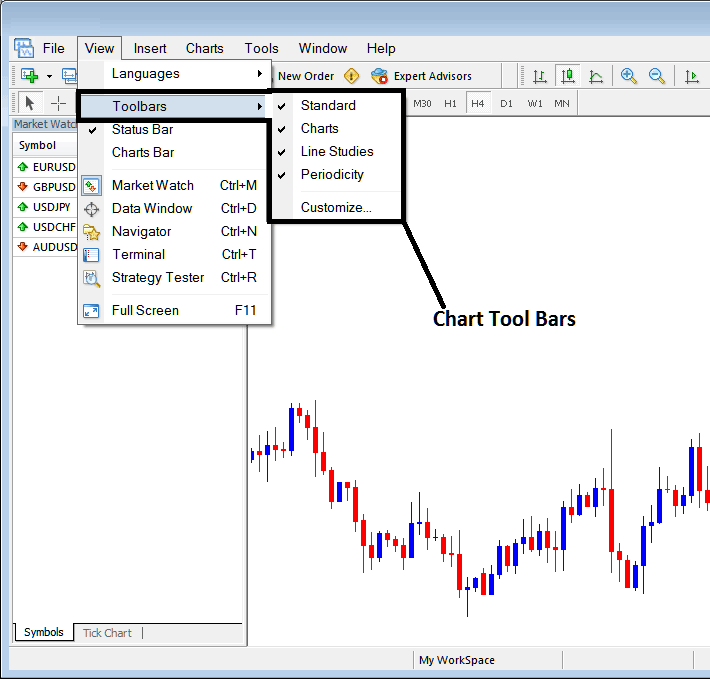
To add a toolbar on the MT4 platform interface, just check or tick the specific toolbar. To remove the tool bar just uncheck the tool-bar you want to remove.
On MT4 the following examples shows what tool bars are:
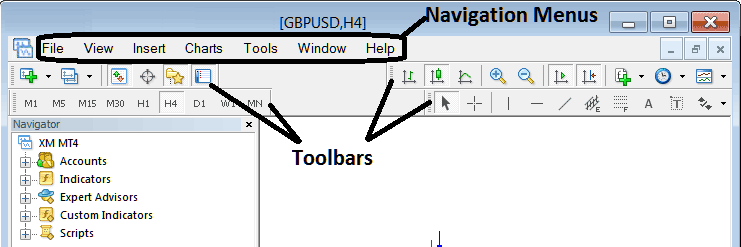
The Four toolbars on MT4 software are:
- Standard Tool Bar
- Charts Tool Bar
- Line Studies Tool Bar
- Periodicity Tool Bar
These MT4 tool bars are shown below, as a trader you can drag and drop these MetaTrader 4 tool bars by clicking your mouse at the left side of these tool bars, on the place that look like a stack of coins on each toolbar, click hold, then drag to where you want to place the MT4 toolbar on the MetaTrader 4 platform then drop. As an exercise you can try to rearrange and arrange back these MetaTrader 4 toolbars on your MT4 Platform.
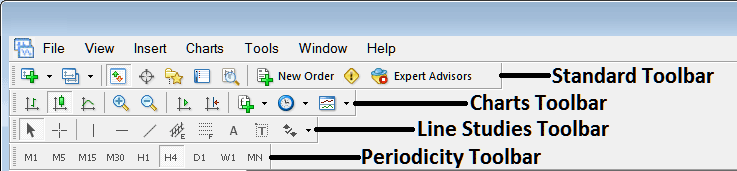
MT4 Stock Trading Platform Tool Bars is a wide topic, and each button on every toolbar is used differently, the explanation of what these tool bar buttons are and how to use them will be covered in another learn stock trading tutorial concentrating on MT4 tool bars alone, explaining each toolbar and each button on each toolbar.
Also Read The Topic : Customizing Tool Bars on MT4